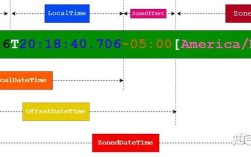
时间戳是什么?
要明确你所说的“时间戳”是指哪一种:
(图片来源网络,侵删)
- Unix 时间戳 (最常见):指自 1970 年 1 月 1 日 00:00:00 UTC (协调世界时) 以来的秒数,这是一个 10 位或 11 位的整数。
- Java 时间戳:在 Java 中,
System.currentTimeMillis()返回的是自 1970 年 1 月 1 日 00:00:00 UTC 以来的毫秒数,这是一个 13 位的整数。
关键区别:秒级时间戳需要乘以 1000 才能转换为毫秒级时间戳,才能被 Java 的 Date 或 Instant 直接使用。
使用传统的 java.util.Date (适用于旧代码)
这是最经典、最直接的方法。java.util.Date 的构造函数接受一个 long 类型的参数,表示自纪元以来的毫秒数。
场景 1:你的时间戳是毫秒级 (13位数字)
如果你的时间戳是 long 类型,并且是 13 位数字(1678886400000),那么可以直接使用。
import java.util.Date;
public class TimestampToDateExample {
    public static void main(String[] args) {
        // 假设这是一个毫秒级时间戳 (13位)
        long timestampInMilliseconds = 1678886400000L; // 2025-03-15 12:00:00 UTC
        // 直接使用毫秒级时间戳创建 Date 对象
        Date date = new Date(timestampInMilliseconds);
        System.out.println("时间戳 (毫秒): " + timestampInMilliseconds);
        System.out.println("对应的 Date 对象: " + date);
    }
}
输出示例:
(图片来源网络,侵删)
时间戳 (毫秒): 1678886400000
对应的 Date 对象: Wed Mar 15 12:00:00 CST 2025(注意:CST 是中国标准时间的缩写,但具体显示的时区取决于你的 JVM 默认时区)
场景 2:你的时间戳是秒级 (10位或11位数字)
如果你的时间戳是 long 类型,但只有 10 或 11 位数字(1678886400),你必须先将其乘以 1000 转换为毫秒。
import java.util.Date;
public class TimestampToDateExample {
    public static void main(String[] args) {
        // 假设这是一个秒级时间戳 (10位)
        long timestampInSeconds = 1678886400L; // 2025-03-15 12:00:00 UTC
        // 关键步骤:将秒级时间戳转换为毫秒级时间戳
        long timestampInMilliseconds = timestampInSeconds * 1000L;
        // 使用转换后的毫秒级时间戳创建 Date 对象
        Date date = new Date(timestampInMilliseconds);
        System.out.println("时间戳 (秒): " + timestampInSeconds);
        System.out.println("转换后的毫秒时间戳: " + timestampInMilliseconds);
        System.out.println("对应的 Date 对象: " + date);
    }
}
输出示例:
时间戳 (秒): 1678886400
转换后的毫秒时间戳: 1678886400000
对应的 Date 对象: Wed Mar 15 12:00:00 CST 2025注意:* 1000L 中的 L 很重要!它告诉 Java 编译器这是一个 long 类型的字面量,可以避免整数溢出问题。
(图片来源网络,侵删)
使用现代的 java.time.Instant (Java 8+ 推荐)
自 Java 8 引入 java.time 包后,java.util.Date 和 java.util.Calendar 被视为遗留类,新的 API 更清晰、更不容易出错,并且是不可变的。
Instant 类是 java.time 包中表示时间线上的一个瞬时点(类似于 Date),它基于 UTC。
场景 1:你的时间戳是毫秒级 (13位数字)
使用 Instant.ofEpochMilli() 方法。
import java.time.Instant;
public class InstantExample {
    public static void main(String[] args) {
        // 毫秒级时间戳
        long timestampInMilliseconds = 1678886400000L;
        // 使用 ofEpochMilli 方法创建 Instant 对象
        Instant instant = Instant.ofEpochMilli(timestampInMilliseconds);
        System.out.println("时间戳 (毫秒): " + timestampInMilliseconds);
        System.out.println("对应的 Instant 对象: " + instant);
    }
}
输出示例:
时间戳 (毫秒): 1678886400000
对应的 Instant 对象: 2025-03-15T12:00:00Z(注意:T 是日期和时间的分隔符,Z 代表 Zulu Time,即 UTC 时间)
场景 2:你的时间戳是秒级 (10位或11位数字)
使用 Instant.ofEpochSecond() 方法。
import java.time.Instant;
public class InstantExample {
    public static void main(String[] args) {
        // 秒级时间戳
        long timestampInSeconds = 1678886400L;
        // 使用 ofEpochSecond 方法创建 Instant 对象
        Instant instant = Instant.ofEpochSecond(timestampInSeconds);
        System.out.println("时间戳 (秒): " + timestampInSeconds);
        System.out.println("对应的 Instant 对象: " + instant);
    }
}
输出示例:
时间戳 (秒): 1678886400
对应的 Instant 对象: 2025-03-15T12:00:00Z
从 Instant 转换为 Date
如果你有一个旧的 Date API 需要兼容,你可以轻松地从 Instant 转换为 Date。
import java.time.Instant;
import java.util.Date;
public class InstantToDateConversion {
    public static void main(String[] args) {
        long timestampInMilliseconds = 1678886400000L;
        Instant instant = Instant.ofEpochMilli(timestampInstant);
        // 从 Instant 转换为 Date
        // Date.from(Instant) 是一个静态工厂方法
        Date date = Date.from(instant);
        System.out.println("Instant 对象: " + instant);
        System.out.println("转换后的 Date 对象: " + date);
    }
}
输出示例:
Instant 对象: 2025-03-15T12:00:00Z
转换后的 Date 对象: Wed Mar 15 12:00:00 CST 2025
总结与最佳实践
| 任务 | 推荐方法 (Java 8+) | 旧方法 (Java 7 及以下) |
|---|---|---|
| 毫秒时间戳 -> 日期对象 | Instant instant = Instant.ofEpochMilli(milliseconds); |
Date date = new Date(milliseconds); |
| 秒时间戳 -> 日期对象 | Instant instant = Instant.ofEpochSecond(seconds); |
Date date = new Date(seconds * 1000L); |
| 日期对象 -> 格式化字符串 | String formatted = instant.atZone(ZoneId.systemDefault()).format(DateTimeFormatter.ofPattern("yyyy-MM-dd HH:mm:ss")); |
String formatted = new SimpleDateFormat("yyyy-MM-dd HH:mm:ss").format(date); |
核心建议:
- 优先使用
java.time(Java 8+):如果你的项目使用 Java 8 或更高版本,请务必使用Instant、ZonedDateTime、DateTimeFormatter等java.time包中的类,它们是未来,设计更优秀。 - 明确时间戳单位:在处理时间戳时,一定要先搞清楚它是秒级还是毫秒级,这是最常见的错误来源。
- 注意时区:
Instant和Date本身都只存储 UTC 时间,当你需要以特定时区(如 Asia/Shanghai)显示时间时,必须进行转换。// 将 Instant 转换为指定时区的 ZonedDateTime ZonedDateTime shanghaiTime = instant.atZone(ZoneId.of("Asia/Shanghai")); System.out.println("北京时间: " + shanghaiTime); // 输出类似 2025-03-15T20:00:08+08:00[Asia/Shanghai]