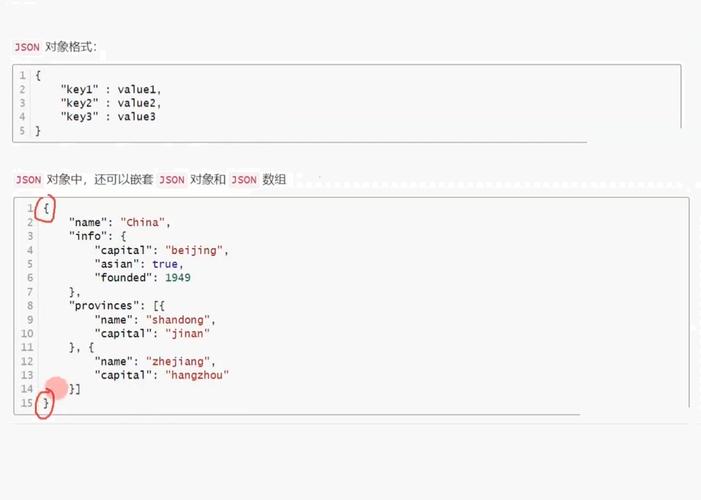
在 Python 中,遍历 JSON 数据(通常解析为字典或列表)的键值对可以通过多种方式实现,以下是几种常见的方法,适用于不同结构的数据。
(图片来源网络,侵删)
遍历字典的键值对
JSON 解析后是一个字典(dict),可以直接使用 items() 方法遍历键值对。
示例代码:
import json
# JSON 字符串
json_str = '{"name": "Alice", "age": 25, "city": "New York"}'
# 解析为字典
data = json.loads(json_str)
# 遍历键值对
for key, value in data.items():
    print(f"Key: {key}, Value: {value}")
输出:
Key: name, Value: Alice
Key: age, Value: 25
Key: city, Value: New York
遍历嵌套字典的键值对
JSON 数据是嵌套结构(字典中包含字典或列表),可以使用递归或 json 模块的 JSONDecoder 自定义遍历逻辑。
示例代码(递归遍历):
import json
json_str = '''
{
    "name": "Bob",
    "age": 30,
    "address": {
        "street": "123 Main St",
        "city": "Boston"
    },
    "hobbies": ["reading", "hiking"]
}
'''
data = json.loads(json_str)
def traverse_json(obj, parent_key=""):
    if isinstance(obj, dict):
        for key, value in obj.items():
            new_key = f"{parent_key}.{key}" if parent_key else key
            print(f"Key: {new_key}, Value: {value}")
            traverse_json(value, new_key)
    elif isinstance(obj, list):
        for index, item in enumerate(obj):
            new_key = f"{parent_key}[{index}]"
            print(f"Key: {new_key}, Value: {item}")
            traverse_json(item, new_key)
traverse_json(data)
输出:
Key: name, Value: Bob
Key: age, Value: 30
Key: address, Value: {'street': '123 Main St', 'city': 'Boston'}
Key: address.street, Value: 123 Main St
Key: address.city, Value: Boston
Key: hobbies, Value: ['reading', 'hiking']
Key: hobbies[0], Value: reading
Key: hobbies[1], Value: hiking
遍历 JSON 文件
如果数据存储在 JSON 文件中,可以使用 json.load() 直接读取并遍历。
示例代码:
import json
with open("data.json", "r") as file:
    data = json.load(file)
# 遍历字典
for key, value in data.items():
    print(f"Key: {key}, Value: {value}")
遍历 JSON 数组(列表)
JSON 数据是一个数组(解析为列表),可以直接遍历列表元素。
(图片来源网络,侵删)
示例代码:
import json
json_str = '["apple", "banana", "cherry"]'
data = json.loads(json_str)
for index, value in enumerate(data):
    print(f"Index: {index}, Value: {value}")
输出:
Index: 0, Value: apple
Index: 1, Value: banana
Index: 2, Value: cherry
使用 json.JSONDecoder 自定义遍历
如果需要更灵活的遍历逻辑(例如过滤特定键),可以继承 JSONDecoder 并重写 decode 方法。
示例代码:
import json
class CustomDecoder(json.JSONDecoder):
    def decode(self, json_str):
        data = super().decode(json_str)
        self.traverse(data)
        return data
    def traverse(self, obj):
        if isinstance(obj, dict):
            for key, value in obj.items():
                print(f"Key: {key}, Value: {value}")
                self.traverse(value)
        elif isinstance(obj, list):
            for item in obj:
                self.traverse(item)
json_str = '{"name": "Charlie", "pets": [{"type": "dog"}, {"type": "cat"}]}'
decoder = CustomDecoder()
data = decoder.decode(json_str)
输出:
Key: name, Value: Charlie
Key: pets, Value: [{'type': 'dog'}, {'type': 'cat'}]
Key: type, Value: dog
Key: type, Value: cat| 场景 | 方法 | 示例 |
|---|---|---|
| 简单字典 | data.items() |
for key, value in data.items() |
| 嵌套结构 | 递归或自定义遍历 | traverse_json(data) |
| JSON 文件 | json.load() |
with open("file.json") as f: data = json.load(f) |
| JSON 数组 | enumerate() |
for index, value in enumerate(data) |
| 高级需求 | 继承 JSONDecoder |
class CustomDecoder(json.JSONDecoder) |
选择适合你的数据结构的方法即可高效遍历 JSON 键值对!
(图片来源网络,侵删)