- Web 框架:用于创建和运行 Web 服务器,接收 HTTP 请求并返回响应,最流行和推荐的选择是 Flask 和 FastAPI。
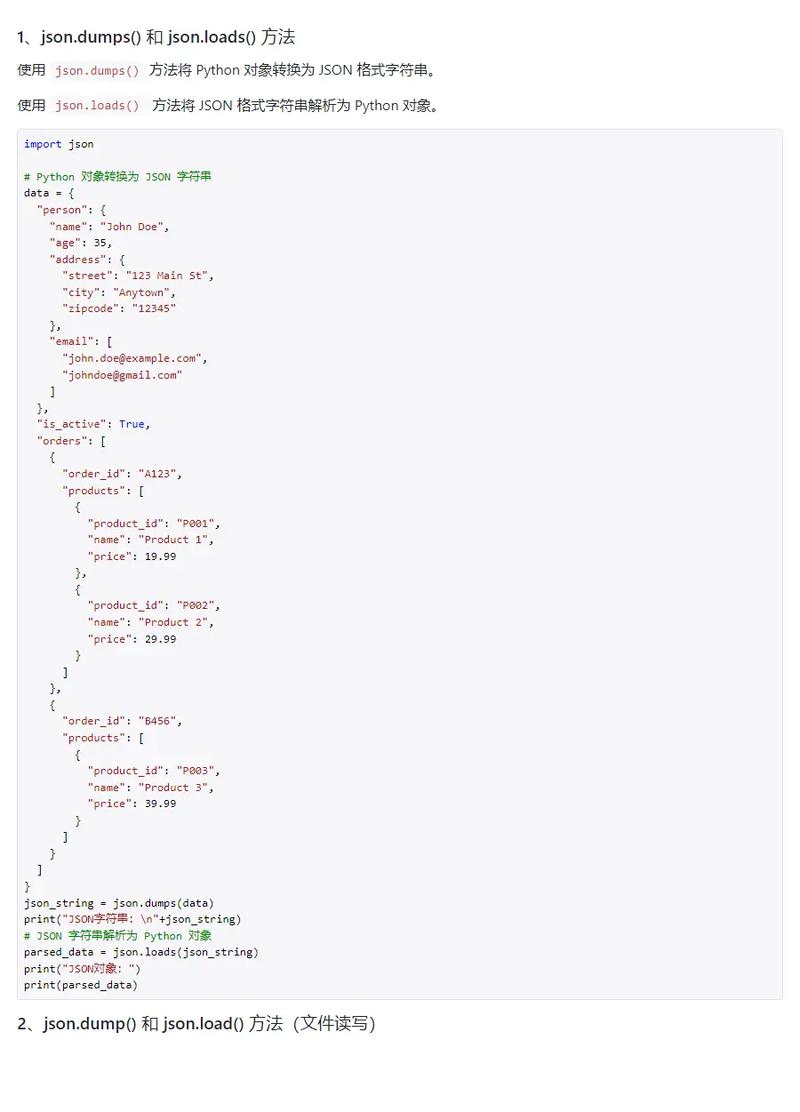
- JSON 处理:Python 内置的
json模块可以轻松地在 Python 字典/列表和 JSON 字符串之间进行转换。
下面我将分别介绍使用 Flask 和 FastAPI 的方法,并提供完整的代码示例。
(图片来源网络,侵删)
使用 Flask (轻量级、易于上手)
Flask 是一个“微框架”,非常灵活,适合小型项目或快速原型开发。
安装 Flask
pip install Flask
创建一个简单的 JSON 接口
我们将创建一个接口,它可以:
- 接收一个
POST请求,请求体是 JSON 数据。 - 从 JSON 数据中提取
name字段。 - 返回一个包含问候语的 JSON 响应。
代码示例 (app.py)
from flask import Flask, request, jsonify
# 创建一个 Flask 应用实例
app = Flask(__name__)
# 定义一个路由,它只接受 POST 请求
@app.route('/api/greet', methods=['POST'])
def greet():
    # 1. 检查请求头是否包含 'application/json'
    if not request.is_json:
        return jsonify({"error": "Request must be JSON"}), 400 # 400 Bad Request
    # 2. 获取请求体中的 JSON 数据,并将其转换为 Python 字典
    data = request.get_json()
    # 3. 从字典中提取 'name' 字段
    name = data.get('name')
    # 4. 进行简单的校验
    if not name:
        return jsonify({"error": "Missing 'name' field in request"}), 400
    # 5. 创建一个 Python 字典作为响应体
    response_data = {
        "message": f"Hello, {name}!",
        "status": "success"
    }
    # 6. 使用 jsonify() 将 Python 字典转换为 JSON 响应
    #    并设置正确的 Content-Type 头为 'application/json'
    #    HTTP 状态码默认为 200 OK
    return jsonify(response_data)
# 如果这个脚本被直接运行,则启动开发服务器
if __name__ == '__main__':
    # debug=True 会在代码修改后自动重载服务器,并在出错时显示详细的调试页面
    app.run(debug=True)
运行和测试
运行应用: 在终端中执行:
(图片来源网络,侵删)
python app.py
你会看到类似下面的输出,表示服务器正在运行:
 * Serving Flask app 'app'
 * Debug mode: on
WARNING: This is a development server. Do not use it in a production deployment.
Use a production WSGI server instead.
 * Running on http://127.0.0.1:5000
Press CTRL+C to quit
测试接口:
你可以使用 curl 命令(在终端中)或 Postman 等工具来测试。
使用 curl 测试:
-
成功请求:
 (图片来源网络,侵删)
curl -X POST \ http://127.0.0.1:5000/api/greet \ -H "Content-Type: application/json" \ -d '{"name": "Alice"}'预期响应:
{ "message": "Hello, Alice!", "status": "success" } -
缺少
name字段的请求:curl -X POST \ http://127.0.0.1:5000/api/greet \ -H "Content-Type: application/json" \ -d '{"age": 30}'预期响应:
{ "error": "Missing 'name' field in request" } -
非 JSON 请求:
curl -X POST \
  http://127.0.0.1:5000/api/greet \
  -H "Content-Type: text/plain" \
  -d 'just some text'
预期响应:
{
  "error": "Request must be JSON"
}
使用 FastAPI (现代、高性能、自动文档)
FastAPI 是一个现代的、快速的(基于 Starlette)Web 框架,用于构建 API,它的巨大优势是自动生成交互式 API 文档(Swagger UI)。
安装 FastAPI 和 Uvicorn (ASGI 服务器)
pip install "fastapi[all]"
# "all" 会自动安装 uvicorn (服务器) 和 pydantic (数据验证)
创建一个 JSON 接口
FastAPI 使用 Pydantic 模型来定义请求数据的结构,这提供了自动的数据验证和序列化功能。
代码示例 (main.py)
from fastapi import FastAPI
from pydantic import BaseModel
from typing import Optional
# 创建一个 FastAPI 应用实例
app = FastAPI()
# 1. 使用 Pydantic 模型定义请求体的结构
#    这样 FastAPI 会自动验证输入数据是否符合此结构
class GreetingRequest(BaseModel):
    name: str Optional[str] = "Mr." # title 是可选的,默认值为 "Mr."
# 2. 定义一个路由,它接受 POST 请求
@app.post("/api/greet-fastapi")
# 3. 将 Pydantic 模型作为函数参数,FastAPI 会自动处理请求解析和验证
def greet_fastapi(item: GreetingRequest):
    # 如果请求不符合 GreetingRequest 的定义(缺少 'name' 字段),
    # FastAPI 会自动返回 422 Unprocessable Entity 错误,并提示具体问题。
    # 4. 直接使用 Pydantic 模型的实例来访问数据
    full_name = f"{item.title} {item.name}".strip()
    # 5. 返回一个 Python 字典,FastAPI 会自动将其转换为 JSON
    #    并设置正确的 Content-Type 头
    return {
        "message": f"Greetings, {full_name}!",
        "status": "success"
    }
# 运行方式:
# 在终端中执行: uvicorn main:app --reload
# main: 是文件 main.py 的名字
# app: 是 FastAPI 实例的名字
# --reload: 代码修改后自动重载服务器
运行和测试
运行应用: 在终端中执行:
uvicorn main:app --reload
服务器会在 http://127.0.0.1:8000 上运行。
测试接口和查看文档:
-
查看自动生成的 API 文档: 打开浏览器访问
http://127.0.0.1:8000/docs,你会看到一个交互式的 Swagger UI 界面,你可以直接在这里测试你的 API。 -
使用
curl测试:-
成功请求:
curl -X POST \
  http://127.0.0.1:8000/api/greet-fastapi \
  -H "Content-Type: application/json" \
  -d '{"name": "Bob", "title": "Dr."}'
预期响应:
{ "message": "Greetings, Dr. Bob!", "status": "success" } -
缺少必需字段
name:curl -X POST \ http://127.0.0.1:8000/api/greet-fastapi \ -H "Content-Type: application/json" \ -d '{"title": "Dr."}'预期响应 (FastAPI 会自动返回):
{
  "detail": [
    {
      "loc": ["body", "name"],
      "msg": "field required",
      "type": "value_error.missing"
    }
  ]
}
-
总结与对比
| 特性 | Flask | FastAPI |
|---|---|---|
| 定位 | 微框架,灵活轻量 | 现代、快速、用于构建 API |
| 易用性 | 非常简单,几行代码就能跑起来 | 稍微复杂,因为有类型提示和 Pydantic |
| 性能 | 较好 (WSGI) | 非常高 (ASGI) |
| 数据验证 | 手动 (request.get_json() + if 判断) |
自动 (通过 Pydantic 模型) |
| API 文档 | 需要额外插件 (如 Flask-RESTx) | 自动生成 (Swagger UI / ReDoc) |
| 类型提示 | 可选,不强制 | 核心,提供更好的 IDE 支持和代码健壮性 |
| 推荐场景 | 小型项目、学习、原型开发 | 生产级 API、微服务、需要高性能和文档的项目 |
如何选择?
- 如果你是初学者,或者只是想快速搭建一个简单的服务,Flask 是一个绝佳的选择。
- 如果你要构建一个正式的、需要高性能、良好文档和强类型检查的 API,FastAPI 是目前的首选,它能为你节省大量手动处理数据和编写文档的时间。