Of course! Let's break down Java Spring MVC, from the core concepts to a practical example.
What is Spring MVC?
Spring MVC is a mature and powerful web framework built on the Spring Framework. It's designed to simplify the process of creating robust, scalable, and maintainable web applications following the Model-View-Controller (MVC) architectural pattern.
The primary goal of Spring MVC is to separate concerns in your application, making it easier to develop, test, and manage.
The Core MVC Pattern Explained
To understand Spring MVC, you first need to understand the MVC pattern it's built on.
-
Model: This is the heart of your application. It represents your data and business logic.
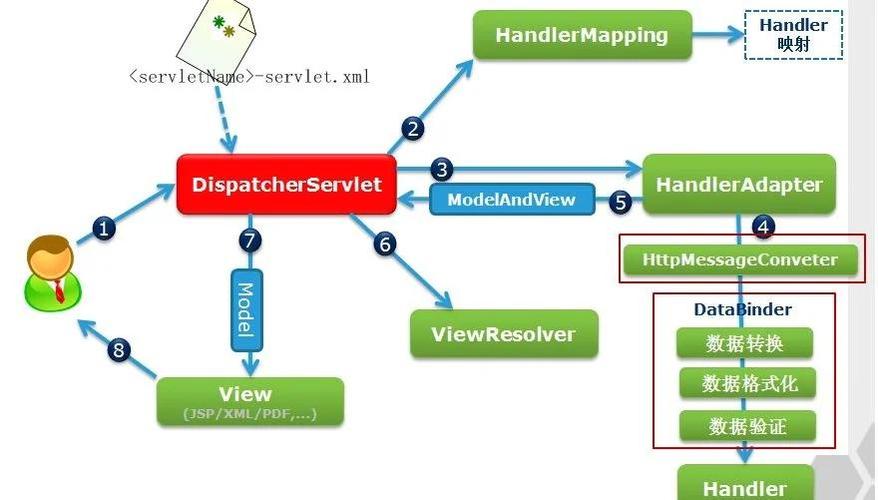
 (图片来源网络,侵删)
- Data: Typically represented by Plain Old Java Objects (POJOs or JavaBeans). For example, a
Userclass withid,name, andemailfields. - Business Logic: The rules and operations that manipulate this data (e.g., validating a user, calculating a price). This is often handled by Service Layer classes.
- Data: Typically represented by Plain Old Java Objects (POJOs or JavaBeans). For example, a
-
View: This is what the user sees. It's responsible for presenting the data from the Model to the user.
- In modern Spring applications, this is almost always a template (like Thymeleaf, FreeMarker, or JSP) that gets rendered into HTML.
- It's a "dumb" component; it shouldn't contain any business logic.
-
Controller: This is the intermediary. It receives user input (from an HTTP request), interacts with the Model to process it, and then selects an appropriate View to render the response.
- In Spring, controllers are typically POJOs annotated with
@Controller. - They handle specific URLs (endpoints) and HTTP methods (GET, POST, etc.).
- In Spring, controllers are typically POJOs annotated with
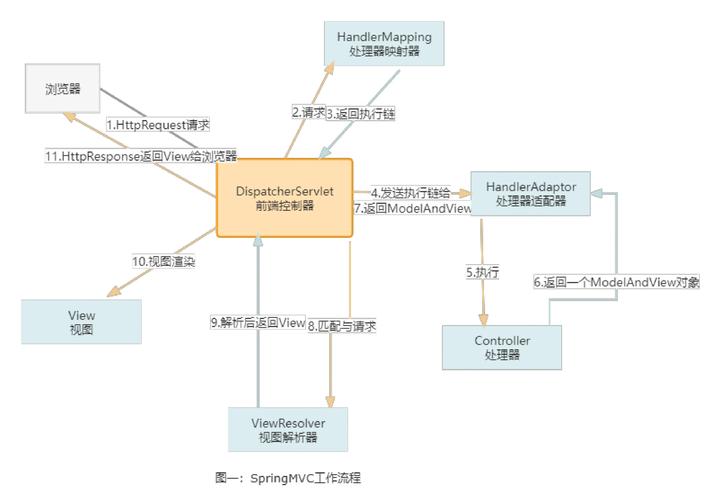
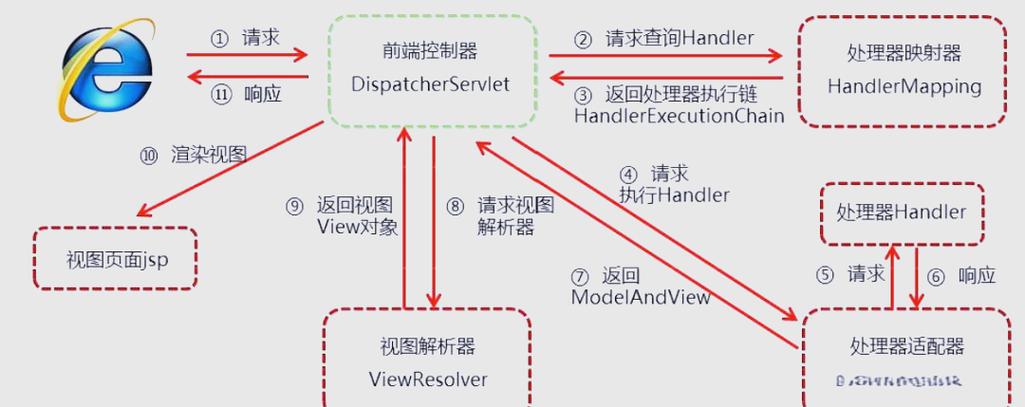
The Request Flow in Spring MVC
Here’s how these components work together when a user makes a request:
- HTTP Request: A user clicks a link or submits a form, sending an HTTP request to the server (e.g.,
GET /users/123). - DispatcherServlet: This is the front controller of Spring MVC. It's the single entry point for all incoming web requests. It receives the request and doesn't handle it directly.
- Handler Mapping: The
DispatcherServletasks aHandlerMappingcomponent to find the right controller method to handle this request. The mapping is usually based on the URL and HTTP method. - Controller: The
DispatcherServletpasses the request to the chosen controller method (e.g., a method in aUserController). - Model & Service: The controller method processes the request. It might:
- Call a Service Layer method to perform business logic.
- Fetch data from a Repository (which talks to a database).
- Package the data into a
Modelobject or aMapto be passed to the view.
- ViewResolver: After the controller finishes, it returns the name of a view (e.g.,
"user-details"). TheDispatcherServletuses aViewResolverto find the actual template file (e.g.,user-details.html). - View: The
DispatcherServletpasses the model data to the resolved view. The view template (e.g., Thymeleaf) renders the data into HTML. - HTTP Response: The final, rendered HTML is sent back to the user's browser as an HTTP response.
Key Spring MVC Annotations
You'll use these annotations constantly to build your application.
| Annotation | Used On | Purpose |
|---|---|---|
@RestController |
Class | A convenience annotation that combines @Controller and @ResponseBody. Used for creating RESTful APIs that return data (like JSON) directly instead of a view. |
@Controller |
Class | Marks a class as a Spring MVC controller. It can handle web requests and return logical view names. |
@GetMapping |
Method | Maps a method to handle an HTTP GET request at a specific URL path. |
@PostMapping |
Method | Maps a method to handle an HTTP POST request. Used for form submissions. |
@PutMapping |
Method | Maps a method to handle an HTTP PUT request (for updating resources). |
@DeleteMapping |
Method | Maps a method to handle an HTTP DELETE request. |
@RequestMapping |
Class/Method | A general-purpose annotation to map requests. Can be used at the class level to define a base path for all its methods. |
@RequestParam |
Method Parameter | Binds a request parameter (e.g., ?name=John) to a method argument. |
@PathVariable |
Method Parameter | Binds a variable from the URL path (e.g., /users/{id}) to a method argument. |
@RequestBody |
Method Parameter | Binds the HTTP request body (usually JSON for APIs) to a Java object. |
@ResponseBody |
Method | Indicates that the return value of the method should be written directly to the HTTP response body, typically as JSON or XML. |
@ModelAttribute |
Method Parameter | Binds request parameters or form data to a model object. |
@Autowired |
Field/Method/Constructor | For dependency injection. Tells Spring to provide an instance of a bean (e.g., a service) automatically. |
A Practical Step-by-Step Example
Let's create a simple "Hello World" web application using Spring Boot (which makes setting up Spring MVC incredibly easy).
Step 1: Project Setup (using Spring Initializr)
Go to start.spring.io and create a new project with:
- Project: Maven
- Language: Java
- Spring Boot: A recent stable version (e.g., 3.x.x)
- Project Metadata:
- Group:
com.example - Artifact:
demo - Name:
demo - Packaging: Jar
- Java: 17 or higher
- Group:
- Dependencies:
Spring Web: This is the essential dependency for building web applications with Spring MVC.Thymeleaf(optional, for server-side rendering): If you want to return HTML pages.
Step 2: Create the Model
Create a simple POJO to represent our data. In src/main/java/com/example/demo/model/, create Message.java:
// src/main/java/com/example/demo/model/Message.java
package com.example.demo.model;
public class Message {
    private String text;
    public Message(String text) {
        this.text = text;
    }
    public String getText() {
        return text;
    }
    public void setText(String text) {
        this.text = text;
    }
}
Step 3: Create the Controller
This is where we define the URL endpoints and handle the requests. In src/main/java/com/example/demo/controller/, create HelloController.java:
// src/main/java/com/example/demo/controller/HelloController.java
package com.example.demo.controller;
import com.example.demo.model.Message;
import org.springframework.stereotype.Controller;
import org.springframework.ui.Model; // org.springframework.ui.Model, not ModelMap
import org.springframework.web.bind.annotation.GetMapping;
import org.springframework.web.bind.annotation.RequestParam;
@Controller
public class HelloController {
    // Handles GET requests to "/hello"
    @GetMapping("/hello")
    public String sayHello(@RequestParam(name = "name", required = false, defaultValue = "World") String name, Model model) {
        // 1. Create a message object
        Message message = new Message("Hello, " + name + "!");
        // 2. Add the message to the model. The key "message" will be used in the Thymeleaf template.
        model.addAttribute("message", message);
        // 3. Return the logical name of the view to be rendered.
        // Spring Boot's default ViewResolver will look for a template named "hello.html".
        return "hello";
    }
}
Step 4: Create the View
Now, let's create the HTML template that will display our message. Spring Boot with Thymeleaf automatically looks for templates in src/main/resources/templates/.
Create src/main/resources/templates/hello.html:
<!-- src/main/resources/templates/hello.html -->
<!DOCTYPE html>
<html lang="en" xmlns:th="http://www.thymeleaf.org">
<head>
    <meta charset="UTF-8">Hello Page</title>
</head>
<body>
    <h1 th:text="${message.text}">Welcome to our website!</h1>
    <p>This message was generated by a Spring MVC controller.</p>
</body>
</html>
- The
xmlns:th="http://www.thymeleaf.org"namespace allows us to use Thymeleaf's attributes. th:text="${message.text}"tells Thymeleaf to replace this tag's content with the value of thetextproperty from themessageobject we added to the model in our controller.
Step 5: Run the Application
Run the DemoApplication.java main class. Your Spring Boot application will start, typically on port 8080.
Step 6: Test It
Open your web browser and navigate to:
http://localhost:8080/hello?name=Spring
You should see the page:
Hello, Spring!
If you go to http://localhost:8080/hello, you'll see:
Hello, World!
Spring MVC vs. Spring Boot
It's crucial to understand the difference:
-
Spring MVC: It's a web framework. It provides the building blocks (DispatcherServlet, controllers, views, etc.) to build a web application. You have to configure many things manually (like the
DispatcherServletinweb.xml, view resolvers, etc.). -
Spring Boot: It's not a replacement for Spring MVC. Instead, it's an opinionated framework built on top of Spring. Its main goal is to simplify the setup and configuration of Spring applications.
- Auto-Configuration: It automatically configures things like the
DispatcherServletand aViewResolverfor Thymeleaf based on the dependencies you have on your classpath. - Starter Dependencies: It provides convenient "starter" POMs (
spring-boot-starter-web) that pull in all the necessary libraries with compatible versions.
- Auto-Configuration: It automatically configures things like the
In short: You use Spring MVC to build your web application's logic, and you use Spring Boot to make building and running that application incredibly easy.