Of course! Welcome to the Python Playground. This is a safe and interactive space where you can experiment with Python code.
Since I can't execute code directly, I'll provide you with examples and explanations. You can copy and paste these into your own Python environment (like a local interpreter, a Jupyter Notebook, or an online service like Google Colab or Replit) to see them in action.
Let's start with the basics and build up to more interesting things.
The Absolute Basics: "Hello, World!" and Variables
Every programming journey starts with a simple program.
# This is a comment. Python ignores it.
# It's good practice to explain what your code does.
# Printing text to the console
print("Hello, Python Playground!")
# Storing information in variables
# A variable is like a labeled box.
message = "Welcome to the playground!"
user_name = "Alex"
# You can combine variables and text using an f-string (formatted string)
# The 'f' before the quote allows you to put variables directly inside {}
print(f"Hello, {user_name}! {message}")
# Variables can hold different types of data
age = 25  # An integer (a whole number)
pi = 3.14 # A float (a number with a decimal point)
is_learning = True # A boolean (True or False)
Try it yourself: Change the user_name and age variables and run the code again.
Data Structures: Lists and Dictionaries
These are how you store collections of data.
Lists (Ordered, Mutable Collections)
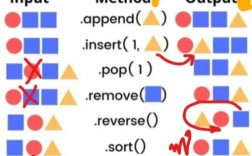
A list is an ordered collection of items, like a shopping list.
# Create a list of fruits
fruits = ["apple", "banana", "cherry", "date"]
# Access an item by its index (starting from 0)
print(f"The first fruit is: {fruits[0]}")
print(f"The third fruit is: {fruits[2]}")
# Add an item to the end of the list
fruits.append("elderberry")
print(f"Updated fruit list: {fruits}")
# Remove an item
fruits.remove("banana")
print(f"After removing banana: {fruits}")
# Loop through a list
print("\n--- All the fruits ---")
for fruit in fruits:
    print(f"I love to eat {fruit}s!")
Dictionaries (Key-Value Pairs)
A dictionary stores data in key-value pairs, like a real dictionary.
# Create a dictionary for a person's profile
person = {
    "name": "Taylor",
    "age": 30,
    "city": "New York",
    "is_student": False
}
# Access a value using its key
print(f"Name: {person['name']}")
print(f"Age: {person['age']}")
# Add a new key-value pair
person["job"] = "Data Scientist"
print(f"Updated profile: {person}")
# Loop through a dictionary's keys and values
print("\n--- Person's Details ---")
for key, value in person.items():
    print(f"{key}: {value}")
Logic and Control Flow: if, elif, else
This is how your code makes decisions.
# A simple game
player_score = 85
if player_score >= 90:
    print("🏆 Outstanding! You got an A+!")
elif player_score >= 80:
    print("👍 Great job! You got an A.")
elif player_score >= 70:
    print("👌 Good work! You got a B.")
else:
    print("Keep practicing! You'll get there.")
# Using 'and' and 'or'
age = 20
has_license = True
if age >= 18 and has_license:
    print("You are legally allowed to drive.")
else:
    print("You cannot drive.")
Functions: Reusing Your Code
Functions are blocks of reusable code. They help you organize and avoid repetition.
# Define a function that takes two arguments
def add_numbers(num1, num2):
    """This function adds two numbers and returns the result."""
    result = num1 + num2
    return result
# Use the function
sum1 = add_numbers(5, 10)
sum2 = add_numbers(-3, 7)
print(f"The sum of 5 and 10 is: {sum1}")
print(f"The sum of -3 and 7 is: {sum2}")
# A function with a default value
def greet(name, greeting="Hello"):
    """Greets a person with a specific greeting."""
    return f"{greeting}, {name}!"
print(greet("Bob"))
print(greet("Alice", "Good morning"))
A Mini-Project: A Simple Number Guessing Game
Let's put everything together into a fun, interactive game.
import random # We need this to generate random numbers
def number_guessing_game():
    """A simple number guessing game."""
    print("Welcome to the Number Guessing Game!")
    print("I'm thinking of a number between 1 and 100.")
    # Generate a random secret number
    secret_number = random.randint(1, 100)
    attempts = 0
    while True:
        try:
            # Get user input
            guess_str = input("Enter your guess: ")
            guess = int(guess_str) # Convert the input string to an integer
            attempts += 1
            # Check the guess
            if guess < secret_number:
                print("Too low! Try again.")
            elif guess > secret_number:
                print("Too high! Try again.")
            else:
                print(f"🎉 Congratulations! You guessed it in {attempts} attempts!")
                break # Exit the loop because the game is over
        except ValueError:
            # Handle cases where the user doesn't enter a number
            print("Invalid input. Please enter a whole number.")
# Start the game
number_guessing_game()
Playing with Data: Pandas (A Taste of Data Analysis)
Python is famous for its data science libraries. Here's a tiny glimpse using pandas.
Note: You'll need to install pandas first: pip install pandas
import pandas as pd
# Create a simple DataFrame (a table-like data structure)
data = {
    'Product': ['Laptop', 'Mouse', 'Keyboard', 'Monitor'],
    'Price': [1200, 25, 75, 300],
    'In_Stock': [True, True, False, True]
}
df = pd.DataFrame(data)
print("--- Original Data ---")
print(df)
# Get some basic info
print("\n--- Data Info ---")
print(df.info())
# Calculate the average price
average_price = df['Price'].mean()
print(f"\nThe average price is: ${average_price:.2f}")
# Filter for products that are in stock
in_stock_products = df[df['In_Stock']]
print("\n--- Products In Stock ---")
print(in_stock_products)
Fun with APIs: Fetching Cat Facts
Python can talk to the internet! Let's fetch a random cat fact from a public API.
Note: You'll need to install the requests library: pip install requests
import requests
import json
def get_cat_fact():
    """Fetches and prints a random cat fact."""
    try:
        # The URL of the cat fact API
        url = "https://catfact.ninja/fact"
        # Make a GET request to the URL
        response = requests.get(url)
        # Check if the request was successful (status code 200)
        response.raise_for_status()
        # Parse the JSON response
        data = response.json()
        # Print the fact
        print("Here is a random cat fact for you:")
        print(data['fact'])
    except requests.exceptions.RequestException as e:
        print(f"Error fetching data: {e}")
# Run the function
get_cat_fact()
What's Next?
The playground is endless! Here are some ideas for what you can explore next:
- File I/O: Read from and write to text files.
- Object-Oriented Programming (OOP): Create your own classes and objects (like
DogorCar). - Web Scraping: Use libraries like
BeautifulSoupto extract data from websites. - Build a Web App: Use a framework like Flask or Django.
- Data Visualization: Create charts and graphs with
MatplotliborSeaborn. - Automate Tasks: Write scripts to rename files, send emails, or interact with your operating system.
The most important rule of the playground is to experiment, break things, and have fun learning! If you have a specific idea or question, just ask.