Of course! The phrase "Python select FTP" can mean a few different things, so I'll cover the most common interpretations.
- Using the
selectmodule for non-blocking FTP operations. (This is the most direct interpretation). - Using the modern
ftplibmodule for FTP operations. (This is the most common and practical way). - Using the
ftpslibrary for secure FTPS operations.
Let's break them down.
Using the select Module for Non-Blocking FTP
The select module in Python allows you to monitor multiple sockets for I/O operations (read, write, "exceptional conditions") without blocking. This is essential for building responsive network applications that need to handle multiple connections simultaneously.
Standard FTP operations using ftplib are blocking. When you call a method like retrlines(), your program will pause until the entire command is finished. select helps you avoid this.
How it works:
- You get the underlying socket from an
ftplib.FTPinstance using thesockattribute. - You use
select.select()to check if that socket is ready for reading or writing. - You then manually read from or write to the socket buffer in small chunks.
This is a low-level approach and can be complex. A simpler way to get non-blocking behavior is to run the FTP operations in a separate thread.
Example: Non-Blocking LIST Command with select
This example demonstrates how to use select to poll the socket for data after initiating a LIST command. It will print data as it becomes available, instead of waiting for the whole transfer.
import socket
import select
import ftplib
def non_blocking_ftp_list(host, user, passwd, port=21, timeout=10):
    """
    Connects to an FTP server and lists files non-blockingly using select.
    """
    try:
        # 1. Create and connect the control socket
        control_socket = socket.socket(socket.AF_INET, socket.SOCK_STREAM)
        control_socket.settimeout(timeout)
        control_socket.connect((host, port))
        print(f"Connected to {host}")
        # 2. Wrap the socket in an FTP instance
        # We will use the raw socket for select, but FTP for commands
        ftp = ftplib.FTP()
        ftp.sock = control_socket
        # 3. Login
        ftp.login(user, passwd)
        print("Logged in successfully.")
        # 4. Initiate the LIST command
        # The FTP object will set up the data connection and return the data socket
        data_socket = ftp.transfercmd('LIST')
        print("LIST command initiated. Waiting for data...")
        # 5. Use select to poll the data socket for readability
        # We need to handle the case where the connection is closed by the server
        is_connected = True
        buffer = b''
        while is_connected:
            # Check if the socket has data to be read
            readable, _, exceptional = select.select([data_socket], [], [data_socket], 1.0)
            if exceptional:
                print("Exceptional condition on socket. Closing.")
                break
            if readable:
                # Read data in chunks
                try:
                    chunk = data_socket.recv(4096)
                    if not chunk:  # An empty chunk means the connection is closed
                        print("\nServer closed the data connection.")
                        is_connected = False
                        break
                    buffer += chunk
                    # Process the received data line by line
                    while b'\n' in buffer:
                        line, buffer = buffer.split(b'\n', 1)
                        print(line.decode('utf-8'))
                except ConnectionResetError:
                    print("\nConnection reset by peer.")
                    is_connected = False
                    break
            else:
                # Timeout, just continue the loop
                pass
        # 6. Clean up
        if data_socket:
            data_socket.close()
        ftp.quit()
        print("FTP session finished.")
    except (socket.timeout, ftplib.all_errors) as e:
        print(f"An error occurred: {e}")
    finally:
        if 'control_socket' in locals() and control_socket:
            control_socket.close()
# --- Usage ---
# Replace with your FTP server details
FTP_HOST = "ftp.dlptest.com"
FTP_USER = "dlpuser"
FTP_PASS = "rNrKYTX9g7z3RgJR"
non_blocking_ftp_list(FTP_HOST, FTP_USER, FTP_PASS)
The Standard & Recommended Way: ftplib
For most use cases, you don't need to use select directly. The built-in ftplib module is high-level, easy to use, and handles all the socket complexities for you.
This is the go-to library for standard FTP in Python.
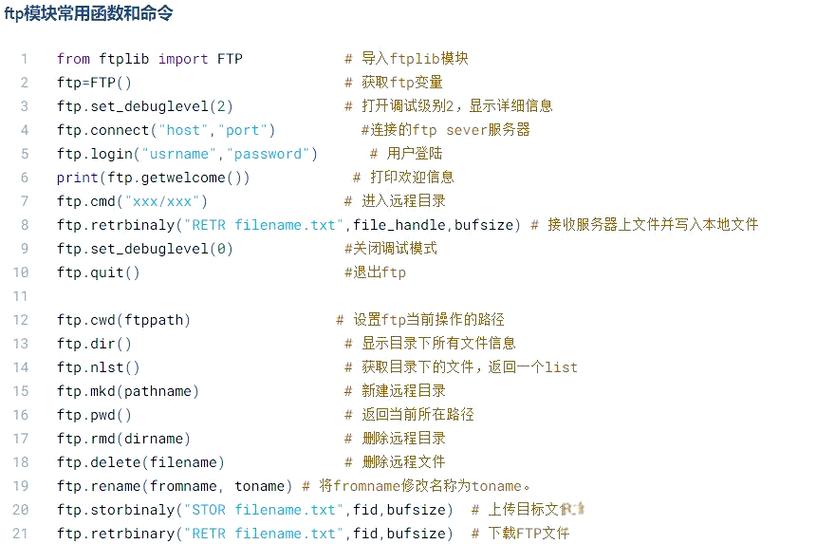
Common ftplib Operations
from ftplib import FTP
import io
# --- Usage ---
FTP_HOST = "ftp.dlptest.com"
FTP_USER = "dlpuser"
FTP_PASS = "rNrKYTX9g7z3RgJR"
try:
    # 1. Connect and Login
    ftp = FTP(FTP_HOST)
    ftp.login(FTP_USER, FTP_PASS)
    print(f"Connected and logged in as {ftp.getwelcome()}")
    # 2. List files (LIST command)
    print("\n--- Directory Listing ---")
    ftp.retrlines('LIST') # This is a blocking but convenient way
    # 3. Download a file (RETR command)
    print("\n--- Downloading a file ---")
    filename_to_download = "README"
    # Use a BytesIO buffer to store the file in memory
    file_buffer = io.BytesIO()
    ftp.retrbinary(f"RETR {filename_to_download}", file_buffer.write)
    # You can now save the buffer to a file or process it
    print(f"Downloaded '{filename_to_download}'. Size: {file_buffer.getbuffer().nbytes} bytes.")
    # To save to a file on disk:
    # with open(f"downloaded_{filename_to_download}", "wb") as f:
    #     ftp.retrbinary(f"RETR {filename_to_download}", f.write)
    # 4. Upload a file (STOR command)
    print("\n--- Uploading a file ---")
    filename_to_upload = "my_local_file.txt"
    # Create a dummy file to upload
    with open(filename_to_upload, "w") as f:
        f.write("Hello from Python FTP client!")
    with open(filename_to_upload, "rb") as f:
        ftp.storbinary(f"STOR {filename_to_upload}", f)
    print(f"Uploaded '{filename_to_upload}'.")
    # 5. Delete a file (DELE command)
    # ftp.delete(filename_to_upload) # Uncomment to test deletion
    # 6. Quit
    ftp.quit()
    print("\nFTP session finished.")
except ftplib.all_errors as e:
    print(f"An FTP error occurred: {e}")
For Secure Connections: FTPS
FTPS (FTP over SSL/TLS) is the standard, secure way to transfer files. It's just like FTP, but the entire connection is encrypted. The ftplib module supports this seamlessly.
You can use two modes:
- Implicit FTPS: The connection is encrypted from the very beginning (port 990). Less common.
- Explicit FTPS: The connection starts unencrypted, and then you issue the
AUTH TLScommand to upgrade to a secure connection. This is the modern standard.
Example: Explicit FTPS with ftplib
from ftplib import FTP, error_perm
import ssl
# --- Usage ---
FTPS_HOST = "ftp.dlptest.com"
FTPS_USER = "dlpuser"
FTPS_PASS = "rNrKYTX9g7z3RgJR"
try:
    # 1. Connect to the server on the standard FTP port (21)
    ftp = FTP(FTPS_HOST)
    print(f"Connected to {FTPS_HOST} on port 21.")
    # 2. Upgrade the connection to secure (Explicit FTPS)
    # This is the key step for explicit FTPS
    ftp.auth('TLS')
    print("Connection upgraded to TLS/SSL.")
    # 3. Login (credentials are now sent securely)
    ftp.login(FTPS_USER, FTPPS_PASS)
    print("Logged in successfully.")
    # 4. Now all commands are sent over a secure channel
    print("\n--- Secure Directory Listing ---")
    ftp.retrlines('LIST')
    # 5. Quit the session
    ftp.quit()
    print("\nSecure FTP session finished.")
except error_perm as e:
    print(f"FTP Permission Error: {e}")
except ftplib.all_errors as e:
    print(f"An FTP error occurred: {e}")
Summary: Which one should you use?
| Method | When to Use | Pros | Cons |
|---|---|---|---|
ftplib |
Almost always. For any standard FTP task. | Simple, high-level, well-documented, handles the complexity for you. | Operations are blocking. |
ftplib + ftps |
When you need secure file transfers. | Secure, uses the familiar ftplib interface. |
Requires understanding of FTPS modes (explicit vs. implicit). |
ftplib + select |
For building high-performance, concurrent servers or clients where you need to manage many sockets in a single thread without blocking. | Highly efficient for I/O-bound tasks, gives you fine-grained control. | Complex, low-level, easy to make mistakes. Threads are often a simpler solution for non-blocking clients. |