Of course! Let's dive deep into Java NIO Buffers. This is a fundamental concept for understanding modern, high-performance I/O in Java.
What is a Buffer?
At its core, a Buffer is a fixed amount of memory that you can use to write data before reading it, or vice-versa. Think of it like a block of memory with a few key pointers that track your position within it.
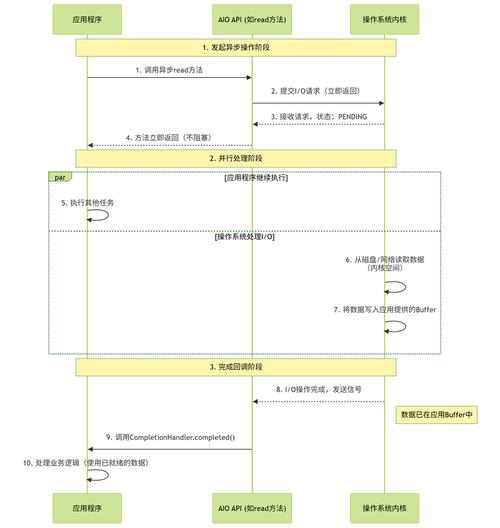
Why is this a big deal? In traditional Java I/O (blocking I/O), you read data directly from a stream (like InputStream) into your application's memory. This forces the operating system to copy data from the kernel's memory to the JVM's memory. NIO Buffers provide a more efficient way to handle this by allowing for direct memory access and, crucially, enabling non-blocking I/O.
The Core Anatomy of a Buffer
A Buffer isn't just a raw array. It's an object that wraps an array and provides state information. The most important internal variables (or "pointers") are:
capacity: The total number of elements the Buffer can hold. This is fixed when the Buffer is created.limit: The index of the first element that should not be read or written. It marks the end of the active portion of the buffer.position: The current position for reading or writing. The next read or write operation will occur at this index.mark: A "bookmark" of a specific position. You can set a mark and later reset the position back to it usingreset().
The Buffer Lifecycle (The Flip)
The most crucial concept to understand with Buffers is the "flip" operation, which transitions the buffer from write mode to read mode.

Let's visualize this with a ByteBuffer of capacity 10:
Step 1: Writing Data (e.g., from a Channel)
You have data coming from a network socket into your buffer. You call methods like put().
capacity: 10limit: 10position: 0
You write 4 bytes of data into the buffer. The position advances after each write.
+---+---+---+---+---+---+---+---+---+---+
| A | B | C | D |   |   |   |   |   |   |  <-- Buffer content
+---+---+---+---+---+---+---+---+---+---+
^                           ^
|                           |
position = 4                 limit = 10
capacity = 10
At this point, position is 4, meaning you've written 4 bytes. The buffer is ready to be read from index 0 up to (but not including) the limit (which is still at the end).
Step 2: The Flip!
Before you can send this data to another destination (like another channel), you must flip the buffer. The flip() method does two things:
- It sets the
positionback to0(the beginning). - It sets the
limitto the currentposition(so you can only read the data you just wrote).
After flip():
+---+---+---+---+---+---+---+---+---+---+
| A | B | C | D |   |   |   |   |   |   |  <-- Buffer content
+---+---+---+---+---+---+---+---+---+---+
^                           ^
|                           |
position = 0                 limit = 4
capacity = 10
Now, the buffer is in read mode. When you call get(), it will read from index 0, then 1, then 2, and then 3. When the position reaches the limit (4), the buffer is "exhausted" for reading.
Step 3: Clearing or Rewinding
After you've read all the data, you have two main options:
clear(): Resets the buffer to be ready for a new writing operation. It setspositionto 0 andlimittocapacity. It does not erase the data; it just resets the pointers.compact(): A more efficient option. It copies any unread data to the beginning of the buffer and then setspositionto the end of that data. This is useful when you only read part of the buffer and want to put more data in the remaining space without overwriting unread data.
Key Buffer Types
NIO provides a Buffer class for each of the primitive types:
ByteBuffer: For bytes. The most common and versatile buffer, used for all I/O operations.CharBuffer: For characters.ShortBuffer: Forshortvalues.IntBuffer: Forintvalues.LongBuffer: Forlongvalues.FloatBuffer: Forfloatvalues.DoubleBuffer: Fordoublevalues.
All these classes share the same core methods (get(), put(), flip(), clear(), etc.) but operate on their respective data types.
Practical Code Example: ByteBuffer
Let's see a ByteBuffer in action. This example shows writing data into a buffer, flipping it, and then reading it back out.
import java.nio.ByteBuffer;
public class BufferExample {
    public static void main(String[] args) {
        // 1. Create a ByteBuffer with a capacity of 10
        ByteBuffer buffer = ByteBuffer.allocate(10);
        // --- WRITE MODE ---
        System.out.println("--- Initial State ---");
        printBufferState(buffer);
        // 2. Write data into the buffer
        System.out.println("\n--- Writing Data ---");
        buffer.put((byte) 'A');
        buffer.put((byte) 'B');
        buffer.put((byte) 'C');
        buffer.put((byte) 'D');
        System.out.println("After writing 4 bytes:");
        printBufferState(buffer);
        // position is now 4, limit is still 10
        // 3. Flip the buffer to switch to READ mode
        System.out.println("\n--- Flipping Buffer ---");
        buffer.flip();
        System.out.println("After flip():");
        printBufferState(buffer);
        // position is now 0, limit is now 4
        // --- READ MODE ---
        System.out.println("\n--- Reading Data ---");
        System.out.println("Reading byte 1: " + buffer.get()); // Reads 'A'
        System.out.println("Reading byte 2: " + buffer.get()); // Reads 'B'
        System.out.println("After reading 2 bytes:");
        printBufferState(buffer);
        // position is now 2, limit is still 4
        // 4. We can flip again to re-read the data, but it's less common.
        // More common is to clear or compact.
        // Let's clear it to prepare for a new write operation.
        System.out.println("\n--- Clearing Buffer ---");
        buffer.clear(); // Resets position to 0, limit to capacity
        System.out.println("After clear():");
        printBufferState(buffer);
        // position is 0, limit is 10. The old data ('A','B','C','D') is still there,
        // but it's considered "overwritable".
    }
    /**
     * Helper method to print the state of the buffer.
     */
    public static void printBufferState(ByteBuffer buffer) {
        System.out.println("Position: " + buffer.position());
        System.out.println("Limit:    " + buffer.limit());
        System.out.println("Capacity: " + buffer.capacity());
    }
}
Output of the code:
--- Initial State ---
Position: 0
Limit:    10
Capacity: 10
--- Writing Data ---
After writing 4 bytes:
Position: 4
Limit:    10
Capacity: 10
--- Flipping Buffer ---
After flip():
Position: 0
Limit:    4
Capacity: 10
--- Reading Data ---
Reading byte 1: 65
Reading byte 2: 66
After reading 2 bytes:
Position: 2
Limit:    4
Capacity: 10
--- Clearing Buffer ---
After clear():
Position: 0
Limit:    10
Capacity: 10
ByteBuffer Special Features
ByteBuffer is the most important buffer type because it's the only one directly used by Channels. It has some special features:
Direct vs. Non-Direct Buffers
-
Non-Direct Buffer (
allocate(int capacity)):- Memory is allocated in the JVM's heap.
- This is easy for the garbage collector to manage.
- However, for I/O operations, the data must be copied from the JVM's heap to the operating system's kernel memory before it can be sent over the network or to disk. This adds overhead.
-
Direct Buffer (
allocateDirect(int capacity)):- Memory is allocated "outside" the JVM, in the native memory of the operating system.
- This is more expensive to create and garbage collect.
- Benefit: It avoids the extra copy step. When you read from a channel into a direct buffer, or write from a direct buffer to a channel, the JVM can use the native memory directly, leading to significant performance gains for large amounts of I/O.
Rule of Thumb: Use direct buffers for high-performance I/O, especially for network or file operations involving large data. For small, in-memory operations, non-direct buffers are simpler and just fine.
Views
A ByteBuffer can be "viewed" as other primitive types. This allows you to read and write multi-byte values (like ints or floats) into the same underlying byte array without manual byte-order manipulation.
ByteBuffer byteBuffer = ByteBuffer.allocate(16);
byteBuffer.asIntBuffer().put(123456789); // Writes an int into the byte buffer
// byteBuffer now contains the 4 bytes representing 123456789
Summary: Buffer vs. Stream
| Feature | Java NIO Buffer | Java I/O Stream |
|---|---|---|
| Data Structure | A block of memory with position, limit, capacity pointers. | A sequence of data (bytes, chars). |
| I/O Model | Can be used for both blocking and non-blocking I/O. | Primarily for blocking I/O. |
| Direction | Bidirectional. You can flip it to read what you wrote. | Unidirectional. An InputStream only reads; an OutputStream only writes. |
| Performance | Can be more efficient due to direct buffers and fewer copies. | Simpler, but can be less performant for high-throughput scenarios. |
| Use Case | High-performance servers, network applications, large file operations. | General-purpose applications, simple file reading/writing, console I/O. |
Conclusion
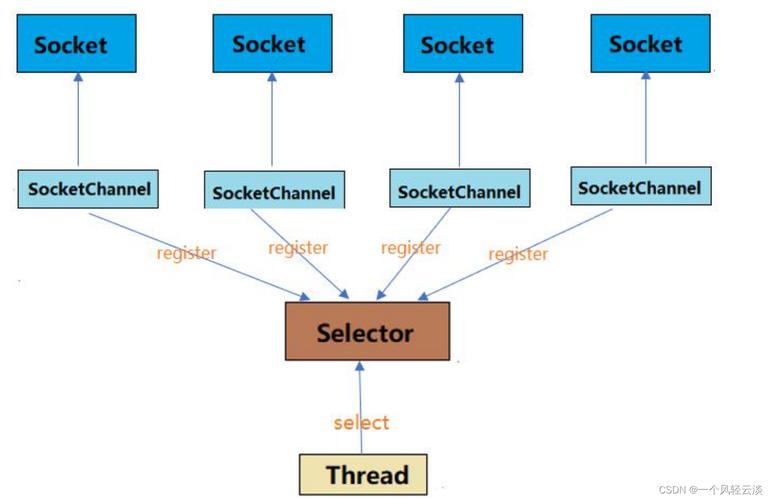
Understanding Java NIO Buffers is essential for moving beyond simple blocking I/O. The flip() mechanism is the heart of the Buffer API, and the distinction between direct and non-direct buffers is key to unlocking performance. Mastering Buffers is the first step towards building scalable, high-performance network applications in Java using Channels and Selectors.