MongoDB Java 分页实现指南
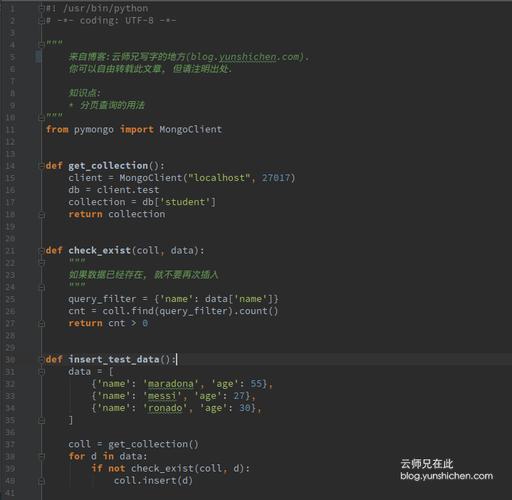
在 MongoDB 中使用 Java 进行分页查询,主要有两种方法:使用 skip() 和 limit(),或者使用聚合管道的 $skip 和 $limit 阶段,下面我将详细介绍这两种方法的实现方式。
(图片来源网络,侵删)
使用 skip() 和 limit()
这是最常用的分页方法,适用于大多数场景。
基本实现
import com.mongodb.client.MongoCollection;
import com.mongodb.client.MongoCursor;
import com.mongodb.client.MongoDatabase;
import org.bson.Document;
public class PaginationExample {
    public static void main(String[] args) {
        // 获取MongoDB连接
        MongoClient mongoClient = new MongoClient("localhost", 27017);
        MongoDatabase database = mongoClient.getDatabase("testdb");
        MongoCollection<Document> collection = database.getCollection("users");
        // 分页参数
        int pageNumber = 1; // 当前页码,从1开始
        int pageSize = 10;  // 每页记录数
        // 计算跳过的记录数
        int skip = (pageNumber - 1) * pageSize;
        // 执行分页查询
        MongoCursor<Document> cursor = collection.find()
                .skip(skip)
                .limit(pageSize)
                .iterator();
        // 处理结果
        try {
            while (cursor.hasNext()) {
                Document doc = cursor.next();
                System.out.println(doc.toJson());
            }
        } finally {
            cursor.close();
            mongoClient.close();
        }
    }
}
注意事项
-
性能问题:当页码很大时(如第1000页),
skip()需要扫描并跳过前面的所有文档,性能会显著下降。 -
排序:分页查询通常需要配合排序使用,以确保分页顺序稳定:
collection.find()
    .sort(new Document("createdAt", -1)) // 按创建时间降序
    .skip(skip)
    .limit(pageSize)
使用聚合管道
对于大数据集或需要更复杂分页逻辑的场景,可以使用聚合管道。
(图片来源网络,侵删)
基本实现
import com.mongodb.client.MongoCollection;
import com.mongodb.client.MongoCursor;
import com.mongodb.client.MongoDatabase;
import org.bson.Document;
import java.util.Arrays;
public class AggregationPaginationExample {
    public static void main(String[] args) {
        // 获取MongoDB连接
        MongoClient mongoClient = new MongoClient("localhost", 27017);
        MongoDatabase database = mongoClient.getDatabase("testdb");
        MongoCollection<Document> collection = database.getCollection("users");
        // 分页参数
        int pageNumber = 1;
        int pageSize = 10;
        int skip = (pageNumber - 1) * pageSize;
        // 执行聚合管道分页
        MongoCursor<Document> cursor = collection.aggregate(Arrays.asList(
            new Document("$sort", new Document("createdAt", -1)), // 先排序
            new Document("$skip", skip),                         // 跳过记录
            new Document("$limit", pageSize)                      // 限制返回数量
        )).iterator();
        // 处理结果
        try {
            while (cursor.hasNext()) {
                Document doc = cursor.next();
                System.out.println(doc.toJson());
            }
        } finally {
            cursor.close();
            mongoClient.close();
        }
    }
}
优点
- 性能更好,特别是对于深度分页
- 可以在分页前进行更复杂的数据处理
最佳实践
-
避免深度分页:对于深度分页(如第100页以后),考虑使用基于游标的分页方法。
-
基于游标的分页:记录最后一条记录的ID或值,下次查询时从该位置开始:
// 第一页查询
Document lastDocument = collection.find()
    .sort(new Document("createdAt", -1))
    .limit(pageSize)
    .first();
// 后续页查询
List<Document> nextPage = collection.find()
    .sort(new Document("createdAt", -1))
    .gt("createdAt", lastDocument.get("createdAt")) // 使用大于条件
    .limit(pageSize)
    .into(new ArrayList<>());
-
索引优化:确保分页查询使用的字段有适当的索引,特别是排序字段。
-
使用MongoDB驱动的新API:较新版本的MongoDB Java驱动提供了更流畅的API:
try (MongoCursor<Document> cursor = collection.find()
        .sort(Sorts.descending("createdAt"))
        .skip(skip)
        .limit(pageSize)
        .iterator()) {
    // 处理结果
}
通过以上方法,你可以在Java应用中高效地实现MongoDB的分页功能。