String 类的核心特点
在介绍方法之前,先回顾一下 String 的两个核心特性,这有助于理解很多方法的底层行为:
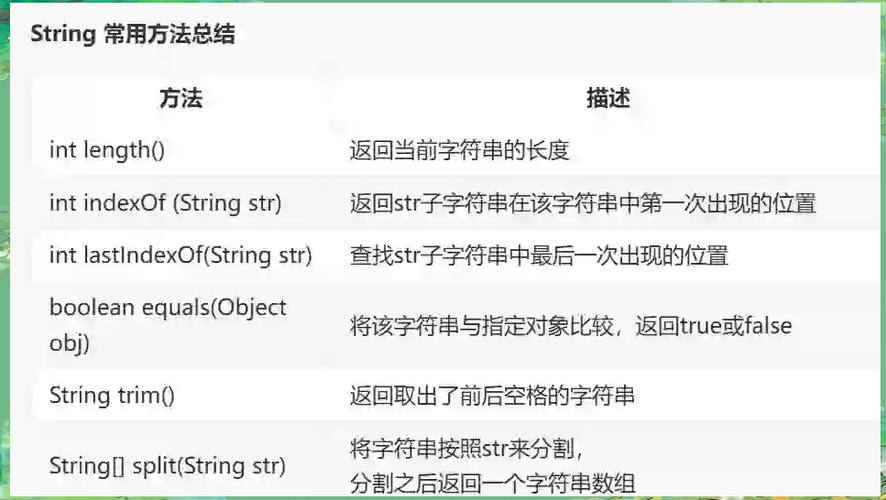
(图片来源网络,侵删)
- 不可变性:
String对象一旦被创建,其内容就不能被改变,任何对字符串的修改操作(如replace,substring,toUpperCase等)都不会改变原始字符串,而是返回一个新的String对象。 - 字符串字面量池:当使用双引号 创建字符串时,JVM 会首先检查字符串常量池中是否已经存在该值的字符串,如果存在,则直接返回引用;如果不存在,则创建一个新的字符串对象并将其放入池中,这有助于提高性能和减少内存占用。
String 类方法详解
我将方法分为以下几类进行说明:
创建与转换
| 方法 | 描述 | 示例 |
|---|---|---|
char charAt(int index) |
返回指定索引处的 char 值,索引从 0 开始。 |
"hello".charAt(1) 返回 'e' |
int codePointAt(int index) |
返回指定索引字符的 Unicode 代码点。 | "A".codePointAt(0) 返回 65 |
byte[] getBytes() |
使用平台的默认字符集将此 String 编码为字节序列。 |
"你好".getBytes() 返回字节数组 |
byte[] getBytes(String charsetName) |
使用指定的字符集将此 String 编码为字节序列。 |
"你好".getBytes("UTF-8") |
byte[] getBytes(Charset charset) |
使用指定的 Charset 将此 String 编码为字节序列。 |
"你好".getBytes(StandardCharsets.UTF_8) |
new String(byte[] bytes) |
使用平台的默认字符集从字节数组创建 String。 |
new String(new byte[]{65, 66}) 返回 "AB" |
new String(byte[] bytes, String charsetName) |
使用指定的字符集从字节数组创建 String。 |
new String(new byte[]{(byte) 0xE4, (byte) 0xBD, (byte) 0xA0}, "UTF-8") 返回 "你" |
static String valueOf(Object obj) |
返回 Object 参数的字符串表示形式。obj 为 null,则返回 "null"。 |
String.valueOf(123) 返回 "123" |
查询与判断
| 方法 | 描述 | 示例 |
|---|---|---|
boolean equals(Object anObject) |
比较此字符串与指定对象是否相等。区分大小写。 | "hello".equals("Hello") 返回 false |
boolean equalsIgnoreCase(String anotherString) |
比较此字符串与另一个字符串是否相等,忽略大小写。 | "hello".equalsIgnoreCase("Hello") 返回 true |
int compareTo(String anotherString) |
按字典顺序比较两个字符串,返回负数、零或正数,分别表示此字符串小于、等于或大于参数字符串。 | "apple".compareTo("banana") 返回负数 |
int compareToIgnoreCase(String str) |
按字典顺序比较两个字符串,忽略大小写。 | "Apple".compareToIgnoreCase("apple") 返回 0 |
boolean contains(CharSequence s) |
当且仅当此字符串包含指定的 char 值序列时,返回 true。 |
"hello world".contains("world") 返回 true |
boolean startsWith(String prefix) |
测试此字符串是否以指定的前缀开头。 | "filename.txt".startsWith("file") 返回 true |
boolean endsWith(String suffix) |
测试此字符串是否以指定的后缀结尾。 | "filename.txt".endsWith(".txt") 返回 true |
boolean isEmpty() |
当 String 长度为 0 时返回 true。 |
"".isEmpty() 返回 true |
int length() |
返回此字符串的长度。 | "hello".length() 返回 5 |
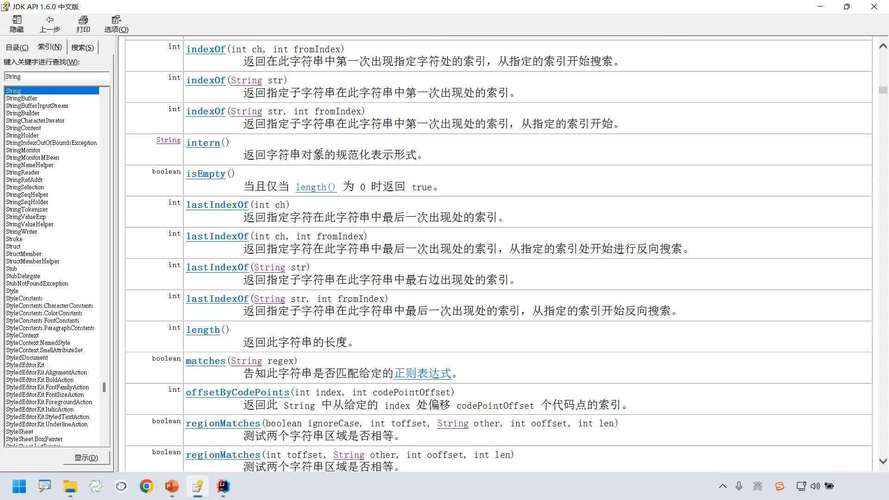
int indexOf(int ch) |
返回指定字符第一次出现的索引。 | "hello".indexOf('e') 返回 1 |
int indexOf(int ch, int fromIndex) |
从指定索引开始,返回指定字符第一次出现的索引。 | "hello".indexOf('l', 3) 返回 3 |
int indexOf(String str) |
返回指定子字符串第一次出现的索引。 | "hello world".indexOf("world") 返回 6 |
int lastIndexOf(int ch) |
返回指定字符最后一次出现的索引。 | "hello".lastIndexOf('l') 返回 3 |
int lastIndexOf(String str) |
返回指定子字符串最后一次出现的索引。 | "ababab".lastIndexOf("ab") 返回 4 |
boolean matches(String regex) |
告知此字符串是否匹配给定的正则表达式。 | "123".matches("\\d+") 返回 true |
修改与操作
这些方法都不会修改原始字符串,而是返回一个新的 String 对象。
| 方法 | 描述 | 示例 |
|---|---|---|
String concat(String str) |
将指定字符串连接到此字符串的末尾。 | "hello".concat(" world") 返回 "hello world" |
String replace(char oldChar, char newChar) |
将所有出现的 oldChar 替换为 newChar。 |
"hello".replace('l', 'p') 返回 "heppo" |
String replace(CharSequence target, CharSequence replacement) |
将所有出现的 target 子序列替换为 replacement。 |
"hello world".replace("world", "java") 返回 "hello java" |
String replaceAll(String regex, String replacement) |
使用给定的正则表达式替换所有匹配的子字符串。 | "123 456 789".replaceAll("\\s", "-") 返回 "123-456-789" |
String replaceFirst(String regex, String replacement) |
使用给定的正则表达式替换第一个匹配的子字符串。 | "a b c d".replaceFirst("\\s", "-") 返回 "a-b c d" |
String[] split(String regex) |
根据给定的正则表达式拆分此字符串。 | "a,b,c".split(",") 返回 ["a", "b", "c"] |
String[] split(String regex, int limit) |
根据匹配的正则表达式拆分此字符串,最多拆分为 limit 个部分。 |
"a,b,c,d".split(",", 2) 返回 ["a", "b,c,d"] |
String substring(int beginIndex) |
返回一个子字符串,从 beginIndex 开始到字符串末尾。 |
"hello".substring(1) 返回 "ello" |
String substring(int beginIndex, int endIndex) |
返回一个子字符串,从 beginIndex 开始到 endIndex(不包含)。 |
"hello".substring(1, 3) 返回 "el" |
String toLowerCase() |
将所有字符转换为小写。 | "HELLO".toLowerCase() 返回 "hello" |
String toUpperCase() |
将所有字符转换为大写。 | "hello".toUpperCase() 返回 "HELLO" |
String trim() |
去除字符串首尾的空白字符(空格、制表符、换行等)。 | " hello world ".trim() 返回 "hello world" |
String intern() |
返回字符串对象的规范表示,如果池中已包含等于此字符串对象的字符串,则返回池中的字符串,否则,将此字符串对象添加到池中,并返回此字符串对象的引用。 | 常用于内存优化,但需谨慎使用。 |
其他实用方法
| 方法 | 描述 | 示例 |
|---|---|---|
char[] toCharArray() |
将此字符串转换为新的字符数组。 | "abc".toCharArray() 返回 ['a', 'b', 'c'] |
static String join(CharSequence delimiter, CharSequence... elements) |
使用指定的 delimiter 连接 elements 数组中的元素。 |
String.join("-", "a", "b", "c") 返回 "a-b-c" |
static String format(String format, Object... args) |
使用指定的格式字符串和参数返回一个格式化字符串。 | String.format("姓名: %s, 年龄: %d", "张三", 30) 返回 "姓名: 张三, 年龄: 30" |
String repeat(int count) |
返回一个字符串,其内容是此字符串重复 count 次后的结果。 (Java 11+) |
"ab".repeat(3) 返回 "ababab" |
String strip() |
去除字符串首尾的空白字符,与 trim() 类似,但能识别更多 Unicode 空白字符。 (Java 11+) |
" \u2002hello\u2002 ".strip() 返回 "hello" |
String stripLeading() |
去除字符串首部的空白字符。 (Java 11+) | " hello ".stripLeading() 返回 "hello " |
String stripTrailing() |
去除字符串尾部的空白字符。 (Java 11+) | " hello ".stripTrailing() 返回 " hello" |
重要注意事项
-
不可变性:这是
String最重要的一点。String s1 = "hello"; String s2 = s1.toUpperCase(); // s2 变为 "HELLO" System.out.println(s1); // 输出仍然是 "hello",s1 没有被改变 System.out.println(s2); // 输出 "HELLO"
-
与
concat: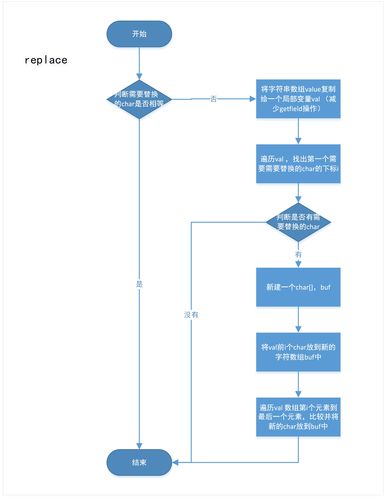 (图片来源网络,侵删)
- 使用 连接字符串时,编译器会自动将其优化为使用
StringBuilder的append()方法,这在循环中尤其高效。 concat()方法内部也会创建一个StringBuffer或StringBuilder来进行连接。- 在大多数情况下, 运算符更简洁易读,性能也相当。
- 使用 连接字符串时,编译器会自动将其优化为使用
-
性能考量:
- 在循环中频繁进行字符串拼接,应优先使用
StringBuilder或StringBuffer,以避免创建大量临时的String对象,造成内存和性能开销。 StringBuffer是线程安全的,但同步开销较大。StringBuilder是非线程安全的,但性能更高,在单线程环境中,StringBuilder是首选。
// 不推荐的方式 String result = ""; for (int i = 0; i < 1000; i++) { result = result + i; // 每次循环都创建一个新的 String 对象 } // 推荐的方式 StringBuilder sb = new StringBuilder(); for (int i = 0; i < 1000; i++) { sb.append(i); // 在同一个 StringBuilder 对象上操作 } String result = sb.toString(); - 在循环中频繁进行字符串拼接,应优先使用
-
null安全:- 直接调用
null对象的任何方法都会抛出NullPointerException。 - Java 8 引入了
java.util.Objects工具类,可以提供更安全的处理方式。 Objects.toString(obj, "default")obj为null,则返回"default"。
- 直接调用
| 功能类别 | 核心方法 | 说明 |
|---|---|---|
| 创建/转换 | charAt(), getBytes(), valueOf() |
获取字符、编码、转换为字符串表示 |
| 查询/判断 | equals(), equalsIgnoreCase(), contains(), startsWith(), indexOf() |
、查找子串、判断前缀/后缀 |
| 修改/操作 | replace(), substring(), split(), toUpperCase(), trim() |
返回新字符串,不修改原对象 |
| 其他 | toCharArray(), join(), format() |
转换为数组、连接、格式化 |
掌握这些 String 类的方法是 Java 开发的基础,理解其不可变性和性能特性,能帮助你写出更健壮、更高效的代码。
(图片来源网络,侵删)