Of course! This is a very common point of confusion for Java developers. The statement java = stringbuffer is not syntactically correct in Java, but it gets to the heart of a fundamental relationship: StringBuffer is a class in the Java API that is used to create and manipulate mutable strings.
Let's break this down into a simple analogy and then a detailed technical explanation.
The Simple Analogy: Building with LEGOs
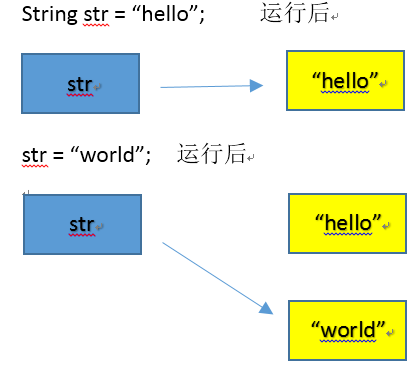
String(like a single, pre-made LEGO model): You can look at it, use it, and even make a copy of it to paint a different color. But you can't change the original model. If you want to add a piece, you have to build a whole new model from scratch. This is immutable.StringBuffer(like a box of loose LEGOs): You have a collection of pieces. You can easily add a new brick, remove one, or change the structure of what you're building. You are modifying the same collection of pieces over and over. This is mutable.
In Java, the java package is the entire toolbox. The StringBuffer is one specific, very useful tool inside that toolbox for building things (strings) that you need to change.
Detailed Technical Explanation
Here’s a breakdown of the relationship between String, StringBuffer, and the java.lang package.
What is StringBuffer?
StringBuffer is a class in Java that represents a mutable sequence of characters.
- Mutable: This is the most important feature. Once a
StringBufferobject is created, you can change its contents by appending, inserting, or deleting characters without creating a new object each time. - Thread-Safe: All public methods in
StringBufferaresynchronized. This means that if multiple threads try to modify the sameStringBufferobject at the same time, the Java runtime ensures that the operations are performed safely and correctly. This makes it slower than its non-thread-safe counterpart,StringBuilder.
How is StringBuffer different from String?
This is the core of the confusion. String and StringBuffer are both used for text, but they behave very differently.
| Feature | String |
StringBuffer |
|---|---|---|
| Mutability | Immutable. Once created, it cannot be changed. | Mutable. Can be changed after creation. |
| Performance | Slower for repeated modifications (like in a loop), as each change creates a new object. | Much faster for repeated modifications, as it modifies the existing object. |
| Thread Safety | Not thread-safe by design (but immutable objects are inherently safe). | Thread-safe (methods are synchronized). |
| Common Use Case | Storing fixed text, like a name, a constant, or a URL that doesn't change. | Building strings dynamically, like in a loop or when reading data from a file/API. |
The Role of the java Package
The java statement isn't something you write in code. In Java, code is organized into packages. The java.lang package is the most fundamental one; it's automatically imported into every Java program.
Stringis in thejava.langpackage.StringBufferis also in thejava.langpackage.
So, the correct way to refer to them in code is:
// No import needed for java.lang classes
String myString = "hello";
StringBuffer myBuffer = new StringBuffer();
Code Examples
Let's see the difference in action.
Example 1: The Immutability of String
When you "modify" a String, you are actually creating a new String object in memory.
public class StringExample {
    public static void main(String[] args) {
        String text = "Java";
        System.out.println("Original object: " + text);
        System.out.println("Memory address (hash code): " + text.hashCode());
        // This looks like modification, but it's not!
        // It creates a brand new String object "Java is fun".
        text = text + " is fun";
        System.out.println("Modified object: " + text);
        System.out.println("New memory address (hash code): " + text.hashCode());
    }
}
Output:
Original object: Java
Memory address (hash code): 2301560
Modified object: Java is fun
New memory address (hash code): 1173239655
Notice the hash code (a rough representation of the memory address) is different. The original "Java" string still exists in memory until the garbage collector cleans it up.
Example 2: The Mutability of StringBuffer
Here, we modify the same object.
public class StringBufferExample {
    public static void main(String[] args) {
        StringBuffer buffer = new StringBuffer("Java");
        System.out.println("Original object: " + buffer);
        System.out.println("Memory address (hash code): " + buffer.hashCode());
        // This actually modifies the existing object in memory.
        buffer.append(" is fun");
        System.out.println("Modified object: " + buffer);
        System.out.println("Same memory address (hash code): " + buffer.hashCode());
    }
}
Output:
Original object: Java
Memory address (hash code): 460141958
Modified object: Java is fun
Same memory address (hash code): 460141958
The hash code is the same! We successfully changed the content of the StringBuffer without creating a new object.
When to Use Which?
-
Use
Stringwhen:- The value of the string will not change.
- You need thread safety for free (since it's immutable).
- You are using string literals (e.g.,
String name = "Alice";).
-
Use
StringBufferwhen:- You need to change the content of a string many times, especially in a multi-threaded environment.
- Performance is critical for string manipulation.
-
Use
StringBuilderwhen:- You need to change the content of a string many times, and you are sure your code will only be accessed by a single thread (which is the most common case).
StringBuilderis identical toStringBufferbut is not thread-safe. Because it doesn't have the overhead ofsynchronizedmethods, it is significantly faster. This is the recommended choice for most single-threaded scenarios today.
Summary
String |
StringBuffer |
StringBuilder |
|
|---|---|---|---|
| Purpose | Fixed, immutable text | Mutable text, thread-safe | Mutable text, not thread-safe |
| Key Feature | Immutability | Synchronization (thread-safety) | Performance (no synchronization) |
| Performance | Slower for modifications | Slower due to synchronization | Fastest for modifications |
| Use Case | Constants, identifiers | Multi-threaded string building | Single-threaded string building (default choice) |