
核心思路
无论使用哪种技术,导出 Excel 的核心流程基本一致:
- 前端:用户点击一个“导出”按钮。
- 后端:
- 接收到导出请求。
- 从数据库或其他数据源查询出需要导出的数据。
- 使用 Excel 操作库(如 Apache POI、EasyExcel)创建一个 Excel 文档。
- 将这个 Excel 文档以文件流的形式写回到 HTTP 响应中。
- 设置正确的 HTTP 响应头,告诉浏览器这是一个需要下载的文件。
- 浏览器:接收到响应后,根据
Content-Type和Content-Disposition头信息,自动弹出下载对话框,让用户保存 Excel 文件。
主流方案对比
在选择技术方案时,主要考虑以下几点:
| 方案 | 优点 | 缺点 | 适用场景 |
|---|---|---|---|
| Apache POI | 功能最强大,支持所有 Excel 版本(.xls, .xlsx),能操作复杂的样式、图表、公式。 |
API 繁琐,代码量大;对于大数据量,内存消耗巨大,容易导致 OOM(内存溢出)。 | 需要精细控制样式、处理复杂文件格式的场景。 |
| EasyExcel (阿里) | API 简洁,基于 POI 封装;解决了 POI 大数据量内存问题,采用 SAX 模式流式读写,内存占用极低。 | 功能相比 POI 稍弱,不支持复杂的图表和公式。 | 强烈推荐,绝大多数 Web 导出场景,尤其是大数据量导出。 |
| JXLS (模板引擎) | 通过定义 Excel 模板文件,将数据填充到模板中,逻辑与视图分离,非常灵活。 | 依赖模板文件,灵活性受限于模板;对动态表头、合并单元格等复杂操作支持不如 POI/EasyExcel。 | 报表格式固定、样式复杂,且希望业务逻辑与 Excel 样式解耦的场景。 |
对于绝大多数 Java Web 项目,EasyExcel 是目前的首选方案,它在易用性和性能之间取得了最佳平衡。
使用 EasyExcel (推荐)
EasyExcel 是阿里巴巴开源的一个优秀的处理 Excel 的开源项目,官网文档非常完善。
添加 Maven 依赖
在你的 pom.xml 文件中添加 EasyExcel 的依赖。
<dependencies>
    <!-- 其他依赖... -->
    <!-- EasyExcel 依赖 -->
    <dependency>
        <groupId>com.alibaba</groupId>
        <artifactId>easyexcel</artifactId>
        <version>3.3.2</version> <!-- 建议使用最新版本 -->
    </dependency>
    <!-- 为了方便演示,添加 Lombok -->
    <dependency>
        <groupId>org.projectlombok</groupId>
        <artifactId>lombok</artifactId>
        <optional>true</optional>
    </dependency>
</dependencies>
准备数据模型
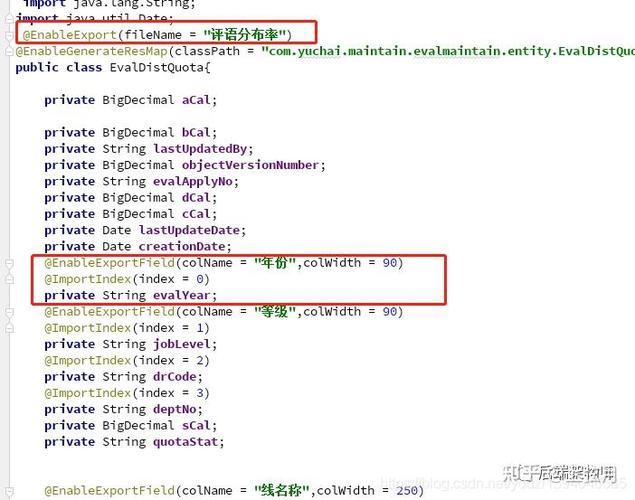
创建一个与 Excel 表头对应的 Java 实体类,使用 @ExcelProperty 注解来指定表头。
import com.alibaba.excel.annotation.ExcelProperty;
import lombok.Data;
@Data
// @Data 是 Lombok 注解,自动生成 getter, setter, toString 等
public class UserData {
    // value 指定表头名称,index 指定列的顺序(可选)
    @ExcelProperty("用户ID")
    private Integer id;
    @ExcelProperty("用户名")
    private String username;
    @ExcelProperty("邮箱")
    private String email;
    @ExcelProperty("创建时间")
    private String createTime;
}
编写 Controller
创建一个 Controller 来处理前端的导出请求。
import com.alibaba.excel.EasyExcel;
import com.example.demo.model.UserData;
import org.springframework.web.bind.annotation.GetMapping;
import org.springframework.web.bind.annotation.RequestMapping;
import org.springframework.web.bind.annotation.RestController;
import javax.servlet.http.HttpServletResponse;
import java.io.IOException;
import java.net.URLEncoder;
import java.util.ArrayList;
import java.util.Date;
import java.util.List;
@RestController
@RequestMapping("/excel")
public class ExcelExportController {
    @GetMapping("/export")
    public void export(HttpServletResponse response) throws IOException {
        // 1. 设置响应头
        // 设置内容类型为 application/vnd.ms-excel,表示这是一个 Excel 文件
        response.setContentType("application/vnd.ms-excel");
        // 设置编码,防止中文乱码
        response.setCharacterEncoding("utf-8");
        // 设置下载文件名,URLEncoder.encode 用于处理文件名中的中文和空格
        String fileName = URLEncoder.encode("用户数据", "UTF-8");
        // attachment 表示以附件形式下载,filename="..." 指定下载的文件名
        response.setHeader("Content-disposition", "attachment;filename=" + fileName + ".xlsx");
        // 2. 查询数据 (这里用模拟数据代替)
        List<UserData> dataList = getDataList();
        // 3. 写入 Excel
        // EasyExcel.write(输出流, 数据模型.class).sheet("工作表名").doWrite(数据列表);
        EasyExcel.write(response.getOutputStream(), UserData.class)
                 .sheet("用户信息") // 指定 sheet 名称
                 .doWrite(dataList); // 写入数据
    }
    // 模拟从数据库查询数据
    private List<UserData> getDataList() {
        List<UserData> list = new ArrayList<>();
        for (int i = 1; i <= 10; i++) {
            UserData data = new UserData();
            data.setId(i);
            data.setUsername("用户" + i);
            data.setEmail("user" + i + "@example.com");
            data.setCreateTime(new Date().toString());
            list.add(data);
        }
        return list;
    }
}
前端调用
你可以使用简单的 HTML + JavaScript 来测试。
<!DOCTYPE html>
<html lang="zh-CN">
<head>
    <meta charset="UTF-8">Excel导出示例</title>
</head>
<body>
    <h1>点击下方按钮导出 Excel</h1>
    <button onclick="exportExcel()">导出用户数据</button>
    <script>
        function exportExcel() {
            // 使用 window.open 或 fetch 发起 GET 请求
            // window.location.href 也可以,但可能会影响当前页面
            window.open('http://localhost:8080/excel/export', '_blank');
        }
    </script>
</body>
</html>
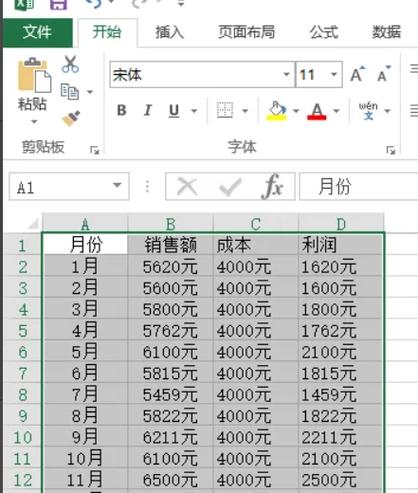
启动你的 Spring Boot 应用,访问这个 HTML 页面,点击按钮,浏览器就会自动下载名为 "用户数据.xlsx" 的文件。
使用 Apache POI (传统方案)
如果你需要使用 POI,或者项目历史代码中已经使用了 POI,可以参考下面的实现。
添加 Maven 依赖
<dependency>
    <groupId>org.apache.poi</groupId>
    <artifactId>poi</artifactId>
    <version>5.2.3</version>
</dependency>
<dependency>
    <groupId>org.apache.poi</groupId>
    <artifactId>poi-ooxml</artifactId>
    <version>5.2.3</version>
</dependency>
修改 Controller (使用 POI)
import org.apache.poi.ss.usermodel.*;
import org.apache.poi.xssf.usermodel.XSSFWorkbook;
import org.springframework.web.bind.annotation.GetMapping;
import org.springframework.web.bind.annotation.RequestMapping;
import org.springframework.web.bind.annotation.RestController;
import javax.servlet.http.HttpServletResponse;
import java.io.IOException;
import java.net.URLEncoder;
import java.util.ArrayList;
import java.util.Date;
import java.util.List;
@RestController
@RequestMapping("/excel")
public class ExcelExportControllerPoi {
    @GetMapping("/export-poi")
    public void exportWithPoi(HttpServletResponse response) throws IOException {
        // 1. 设置响应头
        response.setContentType("application/vnd.ms-excel");
        response.setCharacterEncoding("utf-8");
        String fileName = URLEncoder.encode("用户数据_POI", "UTF-8");
        response.setHeader("Content-disposition", "attachment;filename=" + fileName + ".xlsx");
        // 2. 创建工作簿 (XSSFWorkbook 用于 .xlsx 格式)
        Workbook workbook = new XSSFWorkbook();
        // 3. 创建工作表
        Sheet sheet = workbook.createSheet("用户信息");
        // 4. 创建表头
        Row headerRow = sheet.createRow(0);
        headerRow.createCell(0).setCellValue("用户ID");
        headerRow.createCell(1).setCellValue("用户名");
        headerRow.createCell(2).setCellValue("邮箱");
        headerRow.createCell(3).setCellValue("创建时间");
        // 5. 查询数据
        List<UserData> dataList = getDataList();
        // 6. 写入数据
        int rowNum = 1;
        for (UserData data : dataList) {
            Row row = sheet.createRow(rowNum++);
            row.createCell(0).setCellValue(data.getId());
            row.createCell(1).setCellValue(data.getUsername());
            row.createCell(2).setCellValue(data.getEmail());
            row.createCell(3).setCellValue(data.getCreateTime());
        }
        // 7. 将工作簿写入输出流
        workbook.write(response.getOutputStream());
        // 8. 关闭工作簿,释放资源
        workbook.close();
    }
    // 复用上面的模拟数据方法
    private List<UserData> getDataList() {
        // ... 同上 ...
    }
}
高级特性与最佳实践
大数据量导出 (避免 OOM)
对于 POI,如果数据量很大(比如几十万行),直接将所有数据加载到内存中创建 Workbook 会导致内存溢出。
解决方案:使用 SXSSFWorkbook (POI 的 Streaming Usermodel)
SXSSFWorkbook 是 POI 提供的流式 API,它会在内存中只保留一定数量的行,超过的部分会自动写入临时磁盘文件,从而极大地降低内存消耗。
// 在 POI Controller 中修改
import org.apache.poi.xssf.streaming.SXSSFWorkbook; // 注意这个包
// ...
// 2. 创建 SXSSFWorkbook
// 参数 100 表示在内存中保留的行数,超过的会刷新到磁盘
Workbook workbook = new SXSSFWorkbook(100);
Sheet sheet = workbook.createSheet("用户信息");
// ... 后续代码与普通 POI 几乎一样 ...
对于 EasyExcel,它底层就采用了类似 SAX 的流式读取/写入机制,所以天生就支持大数据量导出,你不需要做任何特殊处理,直接调用 doWrite 即可,它会非常高效且低内存消耗。
复杂样式(加粗、合并单元格等)
EasyExcel 提供了 WriteCellStyle 来设置样式。
// 在 EasyExcel.write(...) 之后链式调用 .registerWriteHandler(...)
EasyExcel.write(response.getOutputStream(), UserData.class)
         .sheet("用户信息")
         .registerWriteHandler(new HorizontalCellStyleStrategy()) // 注册样式处理器
         .doWrite(dataList);
// 自定义样式处理器
public class HorizontalCellStyleStrategy extends AbstractCellWriteHandler {
    @Override
    public void afterCellDispose(WriteSheetHolder writeSheetHolder, WriteTableHolder writeTableHolder, List<CellData> cellDataList, Cell cell, Head head, Integer relativeRowIndex, Boolean isHead) {
        // 只处理表头
        if (isHead) {
            // 获取工作簿
            Workbook workbook = writeSheetHolder.getSheet().getWorkbook();
            // 创建样式
            CellStyle style = workbook.createCellStyle();
            // 创建字体
            Font font = workbook.createFont();
            font.setBold(true); // 加粗
            style.setFont(font);
            // 应用样式到单元格
            cell.setCellStyle(style);
        }
    }
}
动态表头
有时表头不是固定的,需要根据业务动态生成。
EasyExcel 支持通过 Head 对象动态构建表头。
// 在 Controller 中
List<List<String>> headList = new ArrayList<>();
headList.add(List.of("第一层", "第一层"));
headList.add(List.of("第二层", "用户名")); // 合并单元格后的实际表头
List<List<Object>> dataList = new ArrayList<>();
// ... 准备动态数据,数据结构要与表头对应 ...
EasyExcel.write(response.getOutputStream())
         .head(headList) // 设置动态表头
         .sheet("动态表头")
         .doWrite(dataList);
性能优化建议
- 关闭自动列宽:
sheet.autoSizeColumn()会遍历所有数据来计算宽度,非常耗时,如果列数不多或宽度固定,可以手动设置列宽或直接跳过。 - 减少样式对象创建:样式对象(
CellStyle)是与Workbook关联的,创建过多会消耗内存,尽量复用同一个样式对象。 - 选择合适的技术:再次强调,导出优先用 EasyExcel,它已经为你处理好了大部分性能问题。
希望这份详细的指南能帮助你顺利实现 Java Web 中的 Excel 导出功能!


