Of course! In Python, the term "rank" can refer to a few different concepts. I'll cover the three most common ones:
- Ranking in Data Analysis (Pandas): Assigning ranks to values in a dataset (e.g., 1st, 2nd, 3rd). This is the most frequent use case.
- Sorting and Retrieving the Original Index (Python's
list): Getting the indices that would sort a list. - Sorting and Retrieving the Original Index (NumPy): A highly optimized version of the same concept as #2.
Let's break down each one.
Ranking in Data Analysis (Pandas)
This is the most direct interpretation of "ranking". The pandas.DataFrame.rank() method is used to assign ranks to data. It's extremely flexible and handles ties intelligently.
Key Parameters of pandas.Series.rank()
method: How to handle ties. This is the most important parameter.'average'(default): Assigns the average of the ranks (e.g., 2nd and 3rd tie -> both get 2.5).'min': Assigns the minimum of the ranks (e.g., 2nd and 3rd tie -> both get 2).'max': Assigns the maximum of the ranks (e.g., 2nd and 3rd tie -> both get 3).'first': Assigns the rank based on their original order in the array (the first value gets the lower rank).'dense': Like'min', but the rank is not incremented after a tie (e.g., 2nd, 2nd, 3rd -> ranks are 1, 1, 2).
ascending:True(default) for ascending rank (1 is best),Falsefor descending rank.na_option: How to handleNaNvalues.'keep'(default):NaNs are givenNaNranks.'top':NaNs are considered the largest values and ranked at the end.'bottom':NaNs are considered the smallest values and ranked at the beginning.
pct: IfTrue, computes the rank as a percentage (0.0 to 1.0) instead of an integer rank.
Example
import pandas as pd
# Create a Pandas Series with some ties and a NaN
data = [10, 50, 20, 50, 30, 10, None]
s = pd.Series(data, name='Scores')
print("Original Data:")
print(s)
print("-" * 30)
# --- Different Ranking Methods ---
# 1. Default method ('average')
rank_avg = s.rank()
print("Rank (method='average'):")
print(rank_avg)
# Explanation: The two 10s are ranks 1 & 2 -> avg is 1.5.
#             The two 50s are ranks 4 & 5 -> avg is 4.5.
#             The NaN is kept as NaN.
# 2. Method 'min' (often used in sports or competitions)
rank_min = s.rank(method='min')
print("\nRank (method='min'):")
print(rank_min)
# Explanation: The two 10s are both rank 1.
#             The two 50s are both rank 4.
# 3. Method 'first' (based on original order)
rank_first = s.rank(method='first')
print("\nRank (method='first'):")
print(rank_first)
# Explanation: The first 10 is rank 1, the second 10 is rank 2.
#             The first 50 is rank 3, the second 50 is rank 4.
# 4. Method 'dense'
rank_dense = s.rank(method='dense')
print("\nRank (method='dense'):")
print(rank_dense)
# Explanation: The two 10s are both rank 1.
#             The next value, 20, is rank 2.
#             The two 50s are both rank 3.
# 5. Rank as a percentage
rank_pct = s.rank(pct=True)
print("\nRank (as percentage, method='average'):")
print(rank_pct)
# Explanation: 6 valid numbers. The first 10 is 1/6 = 0.167.
# 6. Descending rank (highest value is rank 1)
rank_desc = s.rank(ascending=False, method='min')
print("\nRank (descending, method='min'):")
print(rank_desc)
# Explanation: The two 50s are the highest, so they are both rank 1.
#             The 30 is next, rank 3.
Sorting and Retrieving Original Index (Python's list)
Sometimes you don't want to sort the list itself, but you want to know which indices would sort the list. This is a common task before sorting. Python's built-in sorted() function can do this with a custom key.
The key argument specifies a function to be called on each list element prior to making comparisons. If we use enumerate, we get both the index and the value. By returning the value, sorted will use it for comparison, but it will return the original (index, value) tuples.
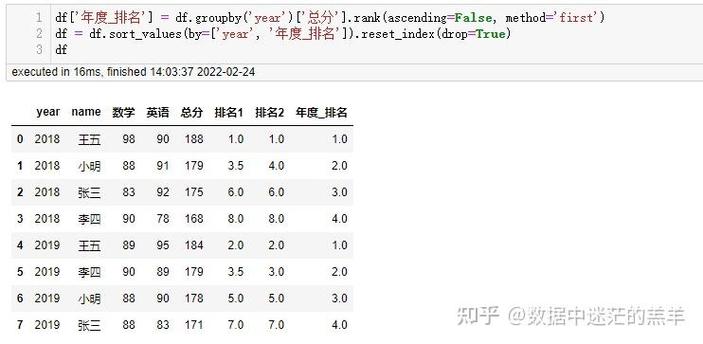
Example
my_list = [40, 10, 30, 20]
# Use sorted with a key to get (original_index, value) pairs
# sorted_enumerated = sorted(enumerate(my_list), key=lambda x: x[1])
# A more direct way is to use the zip function with range
# This creates pairs of (index, value)
indexed_list = list(zip(range(len(my_list)), my_list))
# Now sort this list of tuples based on the second element (the value)
sorted_with_indices = sorted(indexed_list, key=lambda x: x[1])
print(f"Original List: {my_list}")
print(f"Sorted with Original Indices: {sorted_with_indices}")
# To get just the indices that would sort the list:
sorting_indices = [index for index, value in sorted_with_indices]
print(f"Indices to sort the list: {sorting_indices}")
# You can verify this by creating a new list using these indices:
sorted_list = [my_list[i] for i in sorting_indices]
print(f"List sorted using these indices: {sorted_list}")
Sorting and Retrieving Original Index (NumPy)
For numerical data, NumPy provides a highly optimized function numpy.argsort() which does exactly what the Python example above does, but much faster. It returns the indices that would sort an array.
This is one of the most fundamental and frequently used NumPy functions.
Example
import numpy as np
my_array = np.array([40, 10, 30, 20])
# Get the indices that would sort the array
sorting_indices = np.argsort(my_array)
print(f"Original NumPy Array: {my_array}")
print(f"Indices to sort the array: {sorting_indices}")
# You can use these indices to sort the array directly
sorted_array = my_array[sorting_indices]
print(f"Sorted array: {sorted_array}")
argsort with 2D Arrays
argsort is incredibly powerful with multi-dimensional arrays. By default, it sorts along the last axis.
import numpy as np
# A 2D array
arr_2d = np.array([[10, 2, 5],
                   [9, 1, 8]])
# Get indices that sort each row
# The shape of the output will be the same as the input array
indices = np.argsort(arr_2d)
print("Original 2D Array:")
print(arr_2d)
print("\nIndices that sort each row:")
print(indices)
# Row 0: [1, 2, 0] because arr_2d[0,1]=2 is smallest, then arr_2d[0,2]=5, then arr_2d[0,0]=10
# Row 1: [1, 0, 2] because arr_2d[1,1]=1 is smallest, then arr_2d[1,0]=9, then arr_2d[1,2]=8
# Apply the indices to sort the array
sorted_arr_2d = arr_2d[indices]
print("\nSorted 2D Array:")
print(sorted_arr_2d)
Summary: Which One Should I Use?
| Your Goal | Method to Use | Why |
|---|---|---|
| Assign ranks (1st, 2nd, 3rd) to data | pandas.Series.rank() |
The most direct and flexible tool for ranking, with many options for handling ties and missing data. |
| Get the indices to sort a Python list | sorted(enumerate(my_list), key=...) |
The standard Pythonic way. Good for general-purpose lists and custom sorting logic. |
| Get the indices to sort a NumPy array | numpy.argsort() |
Highly recommended for numerical data. It's much faster and more concise than the Python way. |
| Sort a Pandas DataFrame by a column | df.sort_values(by='column_name') |
This is the standard way to sort a DataFrame, which internally uses ranking concepts. |