
Of course! This is a fundamental and crucial topic in Java development. Let's break down how Java handles String and UTF-8.
The Core Concept: String is Always UTF-16
The most important thing to understand is this:
In Java, every
Stringobject internally stores its characters in UTF-16 format.
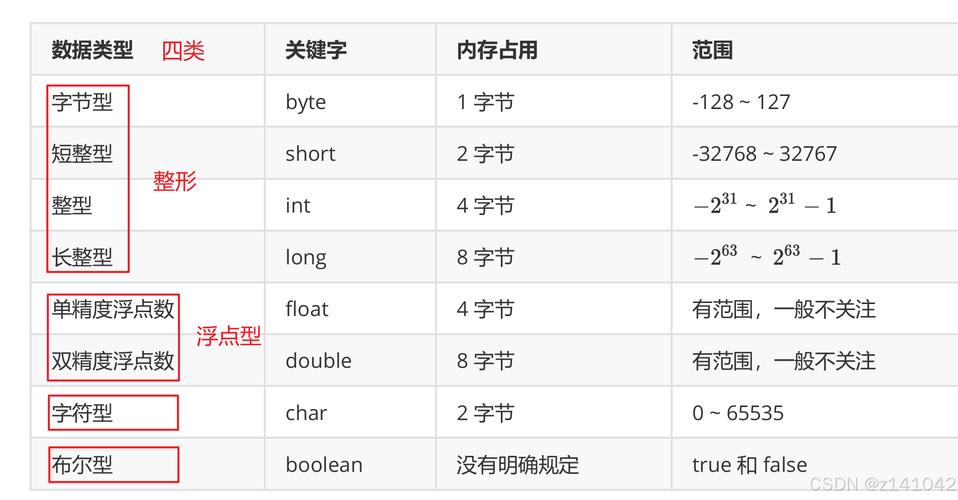
This means you don't have to worry about the encoding of the String object itself. When you create a string in your Java code, like String greeting = "Hello, 世界";, the JVM stores the characters 'H', 'e', 'l', 'l', 'o', ',', ' ', '世', and '界' using UTF-16 encoding.
UTF-16 is a variable-width character encoding where most common characters (like those in the Latin alphabet) take up 2 bytes, while other characters (like Chinese, Japanese, or emojis) can take up 4 bytes.
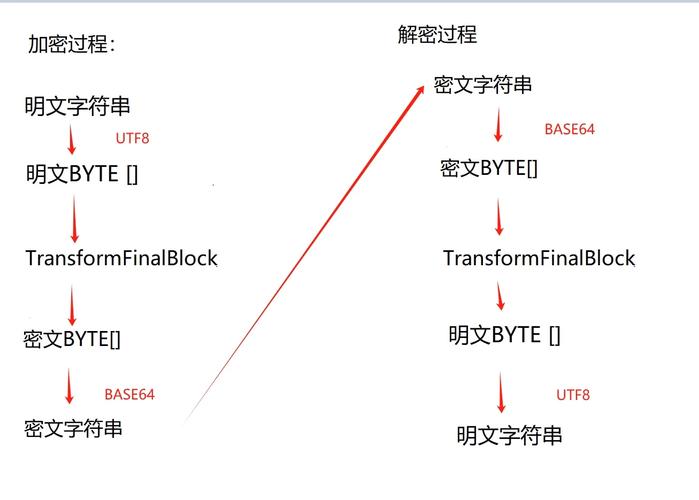
So, why do we talk so much about UTF-8 then? Because UTF-8 is the encoding you use when you need to convert your String to or from a sequence of bytes, which is necessary for almost all I/O operations (reading from/writing to files, network connections, databases, etc.).
The Problem: The Platform's Default Charset
Before Java 18, there was a major pitfall: the platform's default character set.
When you used an I/O method that didn't explicitly specify a charset, Java would fall back to the default charset of the underlying operating system.
- On Linux and macOS: The default is often
UTF-8. - On Windows: The default used to be
CP1252(or another legacy encoding likeGBKin some regions).
This created a classic bug: a Java application that worked perfectly on a developer's Linux machine would fail with garbled characters ("mojibake") when deployed to a Windows server.
Example of the Problem:
import java.io.FileWriter;
import java.io.IOException;
public class DefaultCharsetProblem {
    public static void main(String[] args) {
        String text = "This will fail with special chars: é à ü";
        // FileWriter uses the platform's default charset!
        // On Windows (CP1252), 'é' might become '?'
        // On Linux (UTF-8), it works correctly.
        try (FileWriter writer = new FileWriter("output.txt")) {
            writer.write(text);
            System.out.println("File written using default charset.");
        } catch (IOException e) {
            e.printStackTrace();
        }
    }
}
The Solution: Always Specify the Charset
The golden rule of Java I/O is: Always, always, always specify the character set explicitly.
Writing a String to a File (UTF-8)
Use the java.nio package (introduced in Java 7), which is the modern, preferred way.
import java.io.BufferedWriter;
import java.io.IOException;
import java.nio.charset.StandardCharsets;
import java.nio.file.Files;
import java.nio.file.Path;
import java.nio.file.Paths;
public class WriteUtf8File {
    public static void main(String[] args) {
        String text = "Hello, 世界! This is UTF-8.";
        Path path = Paths.get("output_utf8.txt");
        // Use try-with-resources to ensure the writer is closed automatically
        try (BufferedWriter writer = Files.newBufferedWriter(path, StandardCharsets.UTF_8)) {
            writer.write(text);
            System.out.println("File written successfully with UTF-8 encoding.");
        } catch (IOException e) {
            e.printStackTrace();
        }
    }
}
Key points:
StandardCharsets.UTF_8: This is a pre-definedCharsetobject for UTF-8. It's efficient and recommended.Files.newBufferedWriter(): This is the modern way to get a writer that handles the encoding for you.
Reading a File into a String (UTF-8)
Reading is just the reverse process.
import java.io.IOException;
import java.nio.charset.StandardCharsets;
import java.nio.file.Files;
import java.nio.file.Path;
import java.nio.file.Paths;
public class ReadUtf8File {
    public static void main(String[] args) {
        Path path = Paths.get("output_utf8.txt");
        try {
            // Read all bytes from the file and decode them using UTF-8
            String content = Files.readString(path, StandardCharsets.UTF_8);
            System.out.println("File content read successfully:");
            System.out.println(content);
        } catch (IOException e) {
            e.printStackTrace();
        }
    }
}
Network Communication (e.g., with HttpClient)
When sending data over a network, you must also specify the charset.
import java.net.URI;
import java.net.http.HttpClient;
import java.net.http.HttpRequest;
import java.net.http.HttpResponse;
import java.nio.charset.StandardCharsets;
import java.time.Duration;
public class NetworkRequestWithUtf8 {
    public static void main(String[] args) throws Exception {
        String jsonPayload = "{\"message\": \"Hello from Java with UTF-8: é à ü\"}";
        HttpClient client = HttpClient.newBuilder()
                .version(HttpClient.Version.HTTP_2)
                .connectTimeout(Duration.ofSeconds(10))
                .build();
        HttpRequest request = HttpRequest.newBuilder()
                .uri(URI.create("https://httpbin.org/post"))
                .header("Content-Type", "application/json; charset=UTF-8") // IMPORTANT!
                .timeout(Duration.ofSeconds(10))
                .POST(HttpRequest.BodyPublishers.ofString(jsonPayload, StandardCharsets.UTF_8)) // Specify charset here too
                .build();
        HttpResponse<String> response = client.send(request, HttpResponse.BodyHandlers.ofString(StandardCharsets.UTF_8)); // And here
        System.out.println("Status Code: " + response.statusCode());
        System.out.println("Response Body: " + response.body());
    }
}
Java 18+: A Better Default (UTF-8 by Default)
Recognizing the pain caused by the default charset problem, Java 18 introduced a major improvement. You can now configure the JVM to use UTF-8 as the default charset for all APIs that don't specify one.
You do this by setting the following system property:
java -Dfile.encoding=UTF-8 -jar your-application.jar
Starting with Java 18, this property is considered a "standard" way to set the default. In Java 21 and later, it's even more robust. While it's still best practice to be explicit, this setting can make legacy code or simpler applications more portable across different operating systems.
Summary: Best Practices
| Scenario | The Wrong Way (Relies on Default) | The Right Way (Explicit UTF-8) |
|---|---|---|
| Writing a File | new FileWriter("file.txt") |
Files.newBufferedWriter(path, StandardCharsets.UTF_8) |
| Reading a File | Files.readString(path) |
Files.readString(path, StandardCharsets.UTF_8) |
String to Bytes |
myString.getBytes() |
myString.getBytes(StandardCharsets.UTF_8) |
Bytes to String |
new String(byteArray) |
new String(byteArray, StandardCharsets.UTF_8) |
| Network Request (Body) | HttpRequest.BodyPublishers.ofString(jsonPayload) |
HttpRequest.BodyPublishers.ofString(jsonPayload, StandardCharsets.UTF_8) |
| Network Response (Body) | HttpResponse.BodyHandlers.ofString() |
HttpResponse.BodyHandlers.ofString(StandardCharsets.UTF_8) |
| Servlet Request (Post Body) | request.getReader() |
request.getReader(StandardCharsets.UTF_8) (if charset is known) or request.getCharacterEncoding() to check first. |
| Servlet Response | response.getWriter() |
response.setCharacterEncoding("UTF-8"); response.getWriter(); |
By following these explicit patterns, you ensure that your Java application will handle text correctly and consistently, regardless of the operating system it runs on.


