String.replaceAll() 和 replaceFirst()
这是最简单直接的方法,直接在字符串对象上调用。
replaceAll(String regex, String replacement)
- 功能: 使用给定的正则表达式
regex替换字符串中所有匹配的子串。 - 参数:
regex: 正则表达式。replacement: 用来替换匹配项的字符串。
- 返回值: 替换后的新字符串。
replaceFirst(String regex, String replacement)
- 功能: 使用给定的正则表达式
regex替换字符串中第一个匹配的子串。 - 参数:
regex: 正则表达式。replacement: 用来替换匹配项的字符串。
- 返回值: 替换后的新字符串。
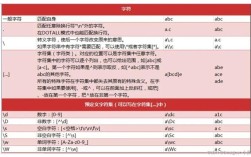
重要提示: 这两个方法中的 replacement 字符串是一个字面替换字符串,它支持一些特殊的反斜杠序列来引用捕获组。
$0: 表示整个匹配的字符串。$1,$2, ...$9: 表示第一个到第九个捕获组匹配的内容。- 表示一个字面的 符号。
$&: 表示整个匹配的字符串 (同$0)。- 表示匹配项之前的字符串。
- 表示匹配项之后的字符串。
示例 1:基本替换
public class RegexReplaceExample {
    public static void main(String[] args) {
        String text = "Hello 123 world 456, welcome to the 789 world.";
        // 将所有数字替换为 "NUMBER"
        String replacedAll = text.replaceAll("\\d+", "NUMBER");
        System.out.println("replaceAll 结果: " + replacedAll);
        // 输出: replaceAll 结果: Hello NUMBER world NUMBER, welcome to the NUMBER world.
        // 只替换第一个数字
        String replacedFirst = text.replaceFirst("\\d+", "FIRST_NUMBER");
        System.out.println("replaceFirst 结果: " + replacedFirst);
        // 输出: replaceFirst 结果: Hello FIRST_NUMBER world 456, welcome to the 789 world.
    }
}
示例 2:使用捕获组进行高级替换
假设我们想将形如 "word1, word2, word3" 的字符串转换为 "word1, word2 and word3"。
public class RegexReplaceWithGroups {
    public static void main(String[] args) {
        String list = "apple, banana, cherry, date";
        // 正则表达式解释:
        // \\s*,\\s* 匹配逗号和它周围可能的空白字符
        // (banana, cherry) 这是一个捕获组,匹配中间的部分
        String result = list.replaceFirst("\\s*,\\s*(banana, cherry)", " and $1");
        System.out.println("替换结果: " + result);
        // 输出: 替换结果: apple and banana, cherry, date
    }
}
一个更通用的例子,将任意数量的单词(用逗号分隔)的最后一个逗号替换为 " and "。
public class RegexReplaceAdvanced {
    public static void main(String[] args) {
        String list = "apple, banana, cherry, date";
        // 正则表达式解释:
        // \\w+ 匹配一个或多个单词字符 (如 apple, banana 等)
        // ,\\s* 匹配一个逗号和它后面的空白
        // (\\w+) 这是一个捕获组,匹配最后一个单词 (如 date)
        // (?=,) 这是一个正向预查,确保后面跟着逗号(但逗号本身不消耗在匹配中)
        // 所以整个正则表达式匹配的是 "cherry, " 这部分,并将 "cherry" 捕获为组1
        String result = list.replaceAll("(\\w+)(?=,)", "$1 and");
        // 这个正则表达式更精确地匹配最后一个逗号前的部分
        // (\\w+)(?=,) 匹配最后一个单词(后面必须跟逗号)
        // ,\\s* 匹配最后的逗号和空白
        // (\\w+) 匹配最后一个单词
        // 我们想保留最后一个单词,只替换前面的部分
        String result2 = list.replaceAll("(\\w+)(?=,)(,\\s*)(\\w+)", "$1 and $3");
        System.out.println("原始字符串: " + list);
        System.out.println("替换结果1: " + result);
        System.out.println("替换结果2: " + result2);
        // 输出:
        // 原始字符串: apple, banana, cherry, date
        // 替换结果1: apple, banana, cherry and date
        // 替换结果2: apple, banana, cherry and date
    }
}
Pattern 和 Matcher 类
当需要更复杂的替换逻辑时(替换的内容需要通过计算得出),使用 Pattern 和 Matcher 类会更灵活,这个过程分三步:
- 编译正则表达式:
Pattern.compile(regex)创建一个Pattern对象。 - 创建匹配器:
pattern.matcher(input)创建一个Matcher对象。 - 执行替换:
matcher.replaceAll(replacement): 替换所有匹配项。matcher.replaceFirst(replacement): 替换第一个匹配项。matcher.appendReplacement()和matcher.appendTail(): 提供最精细的控制,可以在一个循环中处理匹配项,并在替换前后添加自定义逻辑。
示例 3:使用 Matcher 进行简单替换
这与 String.replaceAll() 功能类似,但为更复杂的操作打下了基础。
import java.util.regex.Pattern;
import java.util.regex.Matcher;
public class MatcherReplaceExample {
    public static void main(String[] args) {
        String text = "Order 101 is for 5 apples. Order 102 is for 3 oranges.";
        String regex = "\\d+"; // 匹配数字
        // 1. 编译正则表达式
        Pattern pattern = Pattern.compile(regex);
        // 2. 创建匹配器
        Matcher matcher = pattern.matcher(text);
        // 3. 执行替换
        String result = matcher.replaceAll("[NUM]");
        System.out.println("Matcher replaceAll 结果: " + result);
        // 输出: Matcher replaceAll 结果: Order [NUM] is for [NUM] apples. Order [NUM] is for [NUM] oranges.
    }
}
示例 4:使用 appendReplacement 进行复杂替换
假设我们想把 "Order 101 is for 5 apples" 这样的字符串,替换为 "订单 101: 5 个苹果"。
import java.util.regex.Pattern;
import java.util.regex.Matcher;
public class ComplexReplaceExample {
    public static void main(String[] args) {
        String text = "Order 101 is for 5 apples. Order 102 is for 3 oranges.";
        String regex = "Order (\\d+) is for (\\d+) (\\w+)";
        Pattern pattern = Pattern.compile(regex);
        Matcher matcher = pattern.matcher(text);
        // 使用 StringBuffer 来构建结果字符串
        StringBuffer sb = new StringBuffer();
        // 循环查找所有匹配项
        while (matcher.find()) {
            // 获取捕获组
            String orderNum = matcher.group(1); // 101, 102
            String quantity = matcher.group(2); // 5, 3
            String item = matcher.group(3); // apples, oranges
            // 定义替换字符串,这里可以加入任何逻辑
            String replacement = "订单 " + orderNum + ": " + quantity + " 个" + item;
            // appendReplacement 会将匹配项之前的内容和替换结果追加到 sb 中
            // 并更新 matcher 的位置到匹配项之后
            matcher.appendReplacement(sb, replacement);
        }
        // appendTail 将最后剩余的部分(最后一个匹配项之后的内容)追加到 sb 中
        matcher.appendTail(sb);
        System.out.println("复杂替换结果: " + sb.toString());
        // 输出: 复杂替换结果: 订单 101: 5 个苹果. 订单 102: 3 个 oranges.
    }
}
总结与对比
| 方法 | 来源 | 灵活性 | 适用场景 |
|---|---|---|---|
String.replaceAll() |
java.lang.String |
低,替换内容是固定的字符串或简单的 $n 引用。 |
简单、直接的替换需求。 |
String.replaceFirst() |
java.lang.String |
低,同上。 | 只替换第一个匹配项的简单需求。 |
Matcher.replaceAll() |
java.util.regex.Matcher |
中,替换内容可以是动态计算的字符串。 | 当替换逻辑比 $n 更复杂时。 |
Matcher.appendReplacement() |
java.util.regex.Matcher |
高,可以在循环中处理每个匹配,并添加自定义逻辑。 | 最复杂的替换场景,如条件替换、格式化转换等。 |
常见陷阱与注意事项
-
反斜杠
\的双重转义: 在 Java 字符串中,\是一个转义字符,所以如果你想写一个正则表达式\d(表示数字),你需要在字符串中写成"\\d",第一个\用来转义第二个\,最终才能得到一个\字符给正则表达式引擎。 -
贪婪 vs. 懒惰/非贪婪匹配:
- 是贪婪的,它会匹配尽可能多的字符。
- 是懒惰的,它会匹配尽可能少的字符。 这在替换时会产生完全不同的结果。
String html = "<div>content</div>"; // 贪婪: 匹配从第一个 < 到最后一个 > String greedy = html.replaceAll("<.*>", "REPLACED"); System.out.println("贪婪匹配: " + greedy); // 输出: REPLACED // 懒惰: 匹配从第一个 < 到第一个 > String lazy = html.replaceAll("<.*?>", "REPLACED"); System.out.println("懒惰匹配: " + lazy); // 输出: REPLACEDREPLACED -
replaceAll中的 符号: 如果你的替换字符串中包含一个字面的 符号,必须写成 ,否则 会被解释为对捕获组的引用。String text = "ID: 123"; // 错误: 会抛出 IllegalArgumentException: group 1 not found // String wrong = text.replaceFirst("ID: (\\d+)", "Price: $$1"); // 正确 String correct = text.replaceFirst("ID: (\\d+)", "Price: $$1"); System.out.println(correct); // 输出: Price: $1
希望这份详细的指南能帮助你掌握 Java 中正则表达式替换的用法!