Of course! Here is a comprehensive guide to using Python for Modbus RTU communication, including explanations, code examples, and best practices.
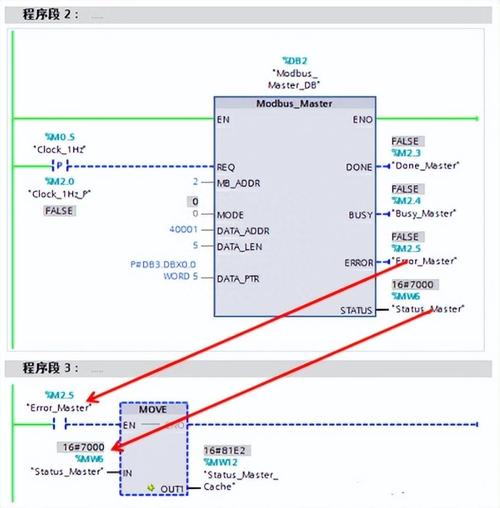
What is Modbus RTU?
- Modbus: A standard, open communication protocol widely used in industrial automation (e.g., connecting PLCs, sensors, and HMIs). It's a master-slave protocol.
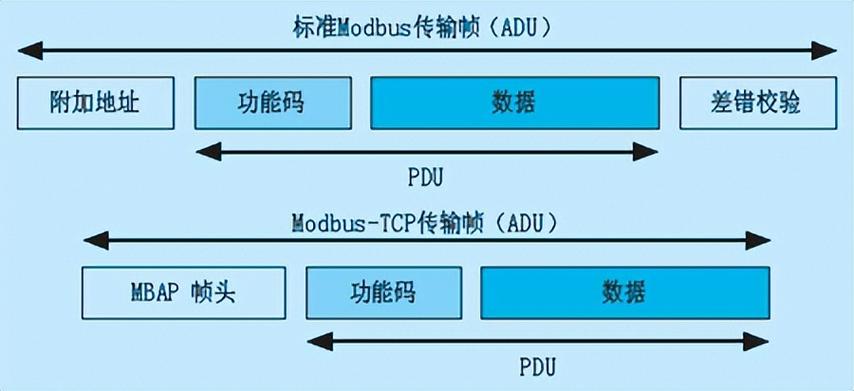
- RTU (Remote Terminal Unit): One of the two main communication formats for Modbus (the other being TCP). RTU is a compact, binary format that is designed for serial communication (like RS-485, RS-232). It's efficient and robust over short distances.
In a Modbus network:
- Master: The device that initiates requests (e.g., a PC, a PLC, a Raspberry Pi).
- Slave: The device that responds to the master's requests (e.g., a sensor, a motor drive, a smart meter). Each slave has a unique address (from 1 to 247).
Key Python Libraries for Modbus RTU
There are two popular and well-maintained libraries:
pymodbus: A full-featured, comprehensive library that supports Modbus RTU, TCP, and ASCII. It's very flexible and can be used for both Master and Slave implementations. This is the recommended library for most projects.minimalmodbus: A simpler, more lightweight library, primarily designed for easy implementation of a Master. It's great for quick scripts and has a very simple API.
We will focus on pymodbus as it's more powerful and versatile.
Step 1: Installation
First, you need to install the library. Open your terminal or command prompt and run:
pip install pymodbus
Step 2: Hardware Setup (Crucial!)
Modbus RTU typically runs over RS-485. This is a differential serial standard that allows for longer distances and multiple devices on the same bus.
Essential Components:
- Master Device: A computer with a USB-to-RS485 converter.
- Slave Device: A Modbus RTU compatible device (e.g., a temperature sensor, a VFD).
- USB-to-RS485 Converter: A small device that connects your computer's USB port to the RS-485 bus. Common ones use chips like FTDI or CH340.
- Termination Resistors: For long cables (> 30 meters), you may need 120-ohm termination resistors at both ends of the bus to prevent signal reflections.
- Biasing Resistors: To ensure a stable idle state on the bus, especially with few devices.
Wiring:
- Connect the A (or ) pin of the USB-to-RS485 converter to the A (or ) terminal of all slave devices.
- Connect the B (or ) pin of the USB-to-RS485 converter to the B (or ) terminal of all slave devices.
- Ensure all devices share a common Ground (GND) connection.
Step 3: Using pymodbus as a Master
The most common use case is a Raspberry Pi or PC acting as a master to read data from slave devices.
Example 1: Reading Holding Registers (Function Code 0x03)
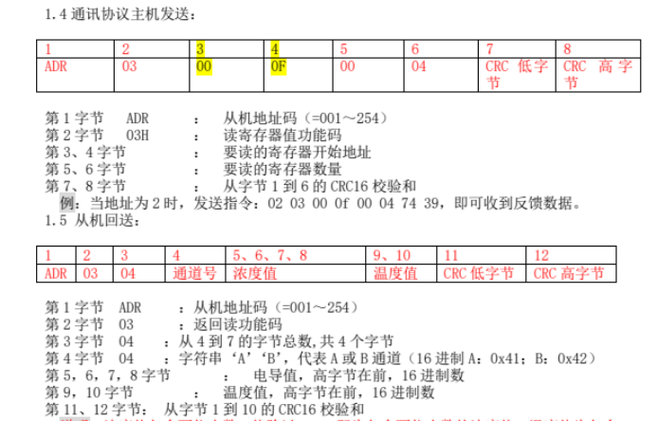
This is the most common operation. Holding registers are typically used to configure devices or read settings. Let's assume we have a slave with address 1 and we want to read 2 registers starting at address 0.
import time
from pymodbus.client import ModbusSerialClient
# --- Configuration ---
# The port where your USB-to-RS485 converter is connected
# On Linux, it's often '/dev/ttyUSB0' or '/dev/ttyACM0'
# On Windows, it's 'COM3' or similar
SERIAL_PORT = '/dev/ttyUSB0'
# Baud rate, must match the slave device's setting
BAUDRATE = 9600
# Parity: 'N' (None), 'E' (Even), 'O' (Odd)
PARITY = 'N'
# Stop bits: 1 or 2
STOPBITS = 1
# Timeout in seconds
TIMEOUT = 1
# Slave ID (Unit ID) of the device you want to communicate with
SLAVE_ID = 1
# --- Client Setup ---
# Create a Modbus RTU client
# The 'framer' parameter tells pymodbus to use the RTU protocol
client = ModbusSerialClient(
    method='rtu',
    port=SERIAL_PORT,
    baudrate=BAUDRATE,
    parity=PARITY,
    stopbits=STOPBITS,
    bytesize=8,  # Always 8 for Modbus
    timeout=TIMEOUT
)
# --- Communication ---
try:
    # Connect to the slave
    print(f"Connecting to slave {SLAVE_ID} on {SERIAL_PORT}...")
    client.connect()
    print("Connection successful.")
    # Define the register address and the number of registers to read
    # Holding registers start at address 0. We want to read 2 registers.
    starting_address = 0
    num_registers = 2
    # Read the holding registers from the slave
    # The result is a ModbusResponse object
    result = client.read_holding_registers(
        address=starting_address,
        count=num_registers,
        slave=SLAVE_ID
    )
    # --- Process the Result ---
    if not result.isError():
        # If the request was successful, result.registers contains the data
        register_values = result.registers
        print(f"Successfully read {num_registers} registers from address {starting_address}.")
        print(f"Register values: {register_values}")
        # You can now use these values in your application
        # For example, if register 0 is a temperature in Celsius * 10:
        temperature_celsius = register_values[0] / 10.0
        print(f"Temperature: {temperature_celsius} °C")
    else:
        # If the request failed (e.g., slave not found, illegal address)
        print(f"Error reading from slave {SLAVE_ID}: {result}")
except Exception as e:
    print(f"An error occurred: {e}")
finally:
    # Always close the connection
    print("Closing connection.")
    client.close()
Example 2: Writing a Single Register (Function Code 0x06)
This is used to send a command or change a setting on a slave device.
# (Use the same client setup as above)
try:
    client.connect()
    print("Connection successful.")
    # Define the register address and the value to write
    register_address = 0  # The register to write to
    value_to_write = 250  # The value to write
    # Write a single register to the slave
    result = client.write_register(
        address=register_address,
        value=value_to_write,
        slave=SLAVE_ID
    )
    if not result.isError():
        print(f"Successfully wrote value {value_to_write} to register {register_address}.")
    else:
        print(f"Error writing to slave {SLAVE_ID}: {result}")
except Exception as e:
    print(f"An error occurred: {e}")
finally:
    client.close()
Step 4: Using pymodbus as a Slave
Sometimes you need your Python program to act as a Modbus slave, for example, to simulate a device or to expose data from a Raspberry Pi to a master PLC.
This requires running the client in a server mode.
import asyncio
from pymodbus.server import StartAsyncTcpServer
from pymodbus.datastore import ModbusSequentialDataBlock
from pymodbus.datastore import ModbusSlaveContext, ModbusServerContext
# --- Datastore Setup ---
# A datastore holds the data for the slave.
# We create a block of 100 holding registers, initialized to 0.
# You can change these values, and they will be returned to the master.
holding_registers = ModbusSequentialDataBlock(0, [0] * 100)
# Create a slave context. We only configure holding registers for this example.
# Other types: discrete_inputs, coils, input_registers
slave_context = ModbusSlaveContext(
    di=None,  # Discrete Inputs
    co=None,  # Coils
    hr=holding_registers,  # Holding Registers
    ir=None  # Input Registers
)
# Create the server context. This can manage multiple slaves.
# Here we have one slave with ID 1.
server_context = ModbusServerContext(slaves={1: slave_context}, single=True)
# --- Run the Server ---
# Pymodbus v3 uses asyncio for the server.
async def run_async_server():
    try:
        print("Starting Modbus RTU Slave Server on /dev/ttyUSB0...")
        # Note: For RTU, you use StartAsyncSerialServer.
        # For TCP, you would use StartAsyncTcpServer.
        await StartAsyncSerialServer(
            server_context,
            framer='rtu',
            port='/dev/ttyUSB0', # Use the same port as your master
            baudrate=9600,
            timeout=1
        )
    except Exception as e:
        print(f"Server error: {e}")
# Run the asyncio event loop
asyncio.run(run_async_server())
To test this, you would run this script, and then use a Modbus master (like another Python script, a Modbus poller tool, or a PLC) to read from or write to slave ID 1.
Best Practices and Troubleshooting
- Check Physical Connection: This is the #1 cause of failure. Ensure your
A/B/GNDwires are secure and correct. Use a multimeter to check for voltage on the RS-485 lines when the master is active. - Match Baud Rate and Settings: The master and slave must have the same
baudrate,parity, andstopbits. A mismatch will result in garbage data or no communication. - Slave ID: Double-check the slave ID. It's easy to make a typo.
- Register Addressing: Be aware of the difference between 0-based and 1-based addressing. Most Modbus documentation uses 1-based (e.g., "Register 40001"). However,
pymodbusand most PLCs use 0-based in code. So, to read "Register 40001", you would useaddress=0in your Python script. - Timeouts: If the slave is not responding, the
TIMEOUTvalue will determine how long your script waits before giving up. Start with a reasonable value like 1-2 seconds. - Error Handling: Always check
if not result.isError():. This will tell you if the slave actively rejected the request (e.g., illegal address, function code not supported). - Permissions (Linux): If you get a
PermissionErroron Linux, your user may not have access to the serial port. You can fix this by adding your user to thedialoutgroup:sudo usermod -a -G dialout $USER
You will need to log out and log back in for this to take effect.