为什么需要 Redis 连接池?
直接每次操作都创建和销毁 Redis 连接(Jedis 或 Lettuce)是非常低效的,这会带来以下问题:
- 性能开销:创建网络连接(TCP 握手)和认证(Redis 密码)是相对耗时的操作,频繁创建和销毁连接会严重影响应用的响应速度。
- 资源浪费:每个连接都会占用服务端和客户端的内存、文件句柄等系统资源,高并发下,可能会耗尽这些资源。
- 不稳定:没有连接池管理,连接可能会因为网络抖动、Redis 服务器重启等原因突然失效,导致应用抛出异常。
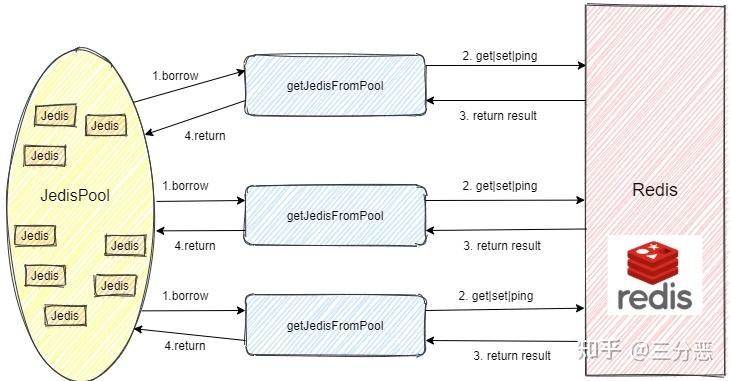
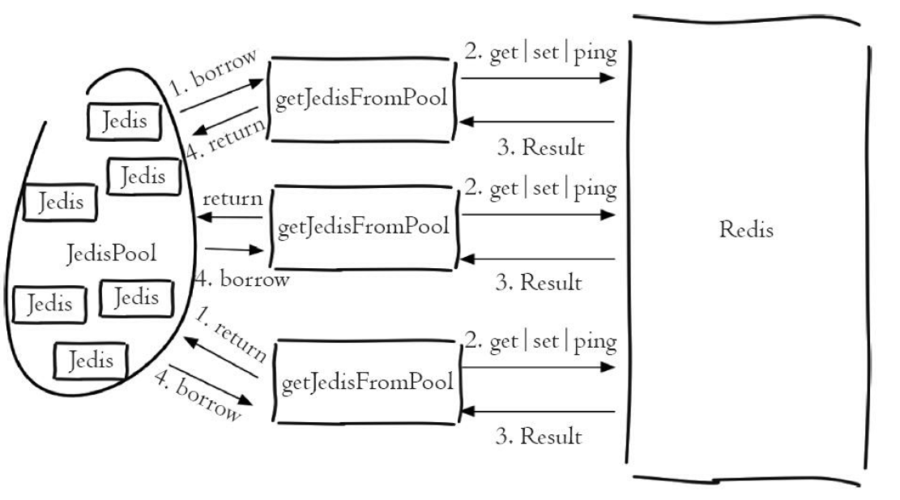
连接池的作用:预先创建一组并保持一定数量的活跃连接,当应用需要访问 Redis 时,从池中“借用”一个连接,用完后“归还”给池,而不是销毁,这样就避免了上述问题。
主流 Java Redis 客户端
目前主流的 Java Redis 客户端有两个,它们都支持连接池:
- Jedis:一个轻量级、高性能的 Redis 客户端,它基于阻塞 I/O (BIO),实现相对简单,是早期非常流行的选择。
- Lettuce:一个功能丰富、可扩展性强的 Redis 客户端,它基于异步和非阻塞 I/O (Netty NIO),性能更高,支持同步、异步和响应式编程,是目前更推荐的选择。
我们将分别介绍如何配置这两个客户端的连接池。
Jedis 连接池配置
Jedis 提供了 JedisPool 类来管理连接池。
1 添加依赖
如果你使用 Maven,在 pom.xml 中添加:
<dependency>
    <groupId>redis.clients</groupId>
    <artifactId>jedis</artifactId>
    <version>5.1.0</version> <!-- 使用最新稳定版本 -->
</dependency>
2 配置与使用
最佳实践是使用 JedisPoolConfig 来配置连接池参数,然后将 JedisPoolConfig 和 Redis 服务器信息一起传给 JedisPool。
import redis.clients.jedis.Jedis;
import redis.clients.jedis.JedisPool;
import redis.clients.jedis.JedisPoolConfig;
public class JedisPoolExample {
    // 1. 创建连接池配置对象
    private static JedisPoolConfig poolConfig = new JedisPoolConfig();
    static {
        // 设置最大连接数(根据你的应用负载和Redis服务器性能来调整)
        poolConfig.setMaxTotal(200);
        // 设置最大空闲连接数
        poolConfig.setMaxIdle(20);
        // 设置最小空闲连接数
        poolConfig.setMinIdle(5);
        // 设置当连接池耗尽时,是否阻塞等待,true表示等待,false表示抛出异常,建议设置为true。
        poolConfig.setBlockWhenExhausted(true);
        // 设置等待超时时间(毫秒)
        poolConfig.setMaxWaitMillis(3000);
        // 在从池中取出连接前,进行有效性检查
        poolConfig.setTestOnBorrow(true);
        // 在将连接放回池中前,进行有效性检查
        poolConfig.setTestOnReturn(true);
        // 在连接空闲时,进行有效性检查
        poolConfig.setTestWhileIdle(true);
        // 设置连接池在空闲时,每隔多久检查一次连接的有效性(毫秒)
        poolConfig.setTimeBetweenEvictionRunsMillis(30000);
    }
    // 2. 创建连接池对象
    private static JedisPool jedisPool = new JedisPool(
            poolConfig,
            "127.0.0.1", // Redis服务器IP
            6379,         // Redis服务器端口
            2000,         // 连接超时时间(毫秒)
            "yourpassword" // Redis密码,如果没有密码则为null
    );
    public static void main(String[] args) {
        // 从连接池中获取一个Jedis连接
        try (Jedis jedis = jedisPool.getResource()) {
            // 使用jedis对象操作Redis
            jedis.set("foo", "bar");
            String value = jedis.get("foo");
            System.out.println("Value from Redis: " + value);
        } catch (Exception e) {
            e.printStackTrace();
        }
        // 注意:在应用程序关闭时,必须关闭连接池,释放资源
        // Runtime.getRuntime().addShutdownHook(new Thread(jedisPool::close));
    }
}
3 关键配置参数说明
| 参数 | 说明 | 推荐值 |
|---|---|---|
maxTotal |
连接池中最大连接数。 | 根据应用峰值 QPS 和 Redis 服务器性能设定,通常设置为 QPS * 平均请求耗时。 |
maxIdle |
连接池中最大空闲连接数。 | 一般小于或等于 maxTotal,建议设置为 maxTotal 的 1/10 到 1/4。 |
minIdle |
连接池中最小空闲连接数。 | 保持一定的空闲连接可以快速响应新的请求。 |
blockWhenExhausted |
连接池耗尽时是否阻塞。 | true,避免因无连接导致应用崩溃。 |
maxWaitMillis |
blockWhenExhausted 为 true 时,等待获取连接的最大毫秒数。 |
3000 (3秒) |
testOnBorrow |
在从池中获取连接前,验证其有效性(执行 PING)。 | true,可以防止获取到已失效的连接。 |
testOnReturn |
在将连接返回池中前,验证其有效性。 | true/false |
testWhileIdle |
对空闲连接进行有效性检查。 | true,防止连接长时间空闲后失效。 |
timeBetweenEvictionRunsMillis |
连接池空闲时,执行空闲连接检查的间隔时间。 | 30000 (30秒) |
Lettuce 连接池配置
Lettuce 的连接池是 Spring Data Redis 提供的 GenericObjectPool,因此需要额外引入 commons-pool2 依赖。
1 添加依赖
<dependency>
    <groupId>io.lettuce</groupId>
    <artifactId>lettuce-core</artifactId>
    <version>6.3.2.RELEASE</version> <!-- 使用最新稳定版本 -->
</dependency>
<dependency>
    <groupId>org.apache.commons</groupId>
    <artifactId>commons-pool2</artifactId>
    <version>2.12.0</version> <!-- 必须依赖 -->
</dependency>
2 配置与使用
Lettuce 的配置对象是 GenericObjectPoolConfig,它与 Jedis 的配置非常相似。
import io.lettuce.core.RedisClient;
import io.lettuce.core.RedisURI;
import io.lettuce.core.api.StatefulRedisConnection;
import io.lettuce.core.support.ConnectionPoolSupport;
import org.apache.commons.pool2.impl.GenericObjectPool;
import org.apache.commons.pool2.impl.GenericObjectPoolConfig;
public class LettucePoolExample {
    public static void main(String[] args) {
        // 1. 创建RedisURI,配置连接信息
        RedisURI redisURI = RedisURI.create("redis://:yourpassword@127.0.0.1:6379/0");
        // 2. 创建RedisClient
        RedisClient redisClient = RedisClient.create(redisURI);
        // 3. 创建连接池配置对象
        GenericObjectPoolConfig<StatefulRedisConnection<String, String>> poolConfig = new GenericObjectPoolConfig<>();
        poolConfig.setMaxTotal(200);
        poolConfig.setMaxIdle(20);
        poolConfig.setMinIdle(5);
        poolConfig.setBlockWhenExhausted(true);
        poolConfig.setMaxWaitMillis(3000);
        // Lettuce有自己的连接验证机制,但也可以配置
        poolConfig.setTestOnBorrow(true);
        poolConfig.setTestOnReturn(true);
        poolConfig.setTestWhileIdle(true);
        poolConfig.setTimeBetweenEvictionRunsMillis(30000);
        // 4. 创建连接池
        // Lettuce的连接池是GenericObjectPool,需要提供PooledObjectFactory
        // ConnectionPoolSupport提供了便捷的工厂方法
        GenericObjectPool<StatefulRedisConnection<String, String>> connectionPool =
                ConnectionPoolSupport.createGenericObjectPool(() -> redisClient.connect(), poolConfig);
        // 5. 从连接池中获取连接
        try (StatefulRedisConnection<String, String> connection = connectionPool.getResource()) {
            // 使用connection操作Redis
            connection.sync().set("foo", "bar");
            String value = connection.sync().get("foo");
            System.out.println("Value from Redis: " + value);
        } catch (Exception e) {
            e.printStackTrace();
        }
        // 6. 应用关闭时,关闭连接池和RedisClient
        // connectionPool.close();
        // redisClient.shutdown();
    }
}
Spring Boot 集成(推荐方式)
在实际项目中,我们通常使用 Spring Boot,它会自动为我们配置好连接池,我们只需要在 application.properties 或 application.yml 中进行配置即可。
1 添加依赖
<dependency>
    <groupId>org.springframework.boot</groupId>
    <artifactId>spring-boot-starter-data-redis</artifactId>
</dependency>
Spring Boot 3.x 默认使用 Lettuce,Spring Boot 2.x 默认使用 Lettuce,如果你想用 Jedis,需要排除默认依赖并手动添加:
<dependency>
    <groupId>org.springframework.boot</groupId>
    <artifactId>spring-boot-starter-data-redis</artifactId>
    <exclusions>
        <exclusion>
            <groupId>io.lettuce</groupId>
            <artifactId>lettuce-core</artifactId>
        </exclusion>
    </exclusions>
</dependency>
<dependency>
    <groupId>redis.clients</groupId>
    <artifactId>jedis</artifactId>
</dependency>
2 在 application.yml 中配置
下面是使用 Lettuce 的配置示例:
spring:
  redis:
    host: 127.0.0.1
    port: 6379
    password: yourpassword # 如果没有密码,可以注释掉或删除这行
    database: 0 # 使用哪个数据库,默认0
    lettuce:
      pool:
        # 连接池最大连接数(使用负值表示没有限制)
        max-active: 200
        # 连接池最大阻塞等待时间(使用负值表示没有限制)
        max-wait: -1ms
        # 连接池中的最大空闲连接
        max-idle: 20
        # 连接池中的最小空闲连接
        min-idle: 5
        # 连接空闲超时时间,超时后将被释放
        time-between-eviction-runs: 30s
3 在代码中使用
Spring Boot 会自动配置一个 RedisTemplate bean,我们直接注入即可使用。
import org.springframework.beans.factory.annotation.Autowired;
import org.springframework.data.redis.core.RedisTemplate;
import org.springframework.web.bind.annotation.GetMapping;
import org.springframework.web.bind.annotation.RestController;
@RestController
public class RedisController {
    @Autowired
    private RedisTemplate<String, Object> redisTemplate;
    @GetMapping("/set")
    public String set() {
        redisTemplate.opsForValue().set("spring-boot-key", "Hello, Spring Boot Redis!");
        return "Set value successfully!";
    }
    @GetMapping("/get")
    public String get() {
        Object value = redisTemplate.opsForValue().get("spring-boot-key");
        return "Value: " + value;
    }
}
Spring Boot 的 RedisTemplate 内部已经集成了连接池管理,我们无需关心连接的获取和释放。
总结与最佳实践
| 特性 | Jedis | Lettuce | Spring Boot 集成 |
|---|---|---|---|
| I/O 模型 | 阻塞 I/O (BIO) | 异步/非阻塞 I/O (NIO) | 默认使用 Lettuce,可配置 Jedis |
| 性能 | 较高 | 更高,尤其在高并发下 | 高 |
| 易用性 | 简单直接 | API 更丰富,支持异步/响应式 | 非常简单,自动配置 |
| 连接池 | JedisPool |
GenericObjectPool (来自 commons-pool2) |
自动配置,无需手动管理 |
| 推荐场景 | 简单项目,对依赖大小敏感 | 生产环境首选,高并发、高性能应用 | 所有 Spring Boot 项目 |
最佳实践建议:
- 优先使用 Spring Boot 集成:如果你在使用 Spring Boot,这是最简单、最可靠的方式,无需手动创建和管理连接池。
- 不使用 Spring Boot 时,优先选择 Lettuce:Lettuce 的 NIO 模型在高并发下表现更好,且 API 设计更现代。
- 合理配置连接池参数:
maxTotal,maxIdle,minIdle是最关键的参数,需要根据你的应用负载和服务器资源进行调整。 - 始终关闭资源:在应用关闭时,务必调用
jedisPool.close()或connectionPool.close()来释放连接池占用的资源。 - 处理异常:网络问题可能导致连接失效,代码中应有适当的异常处理机制。