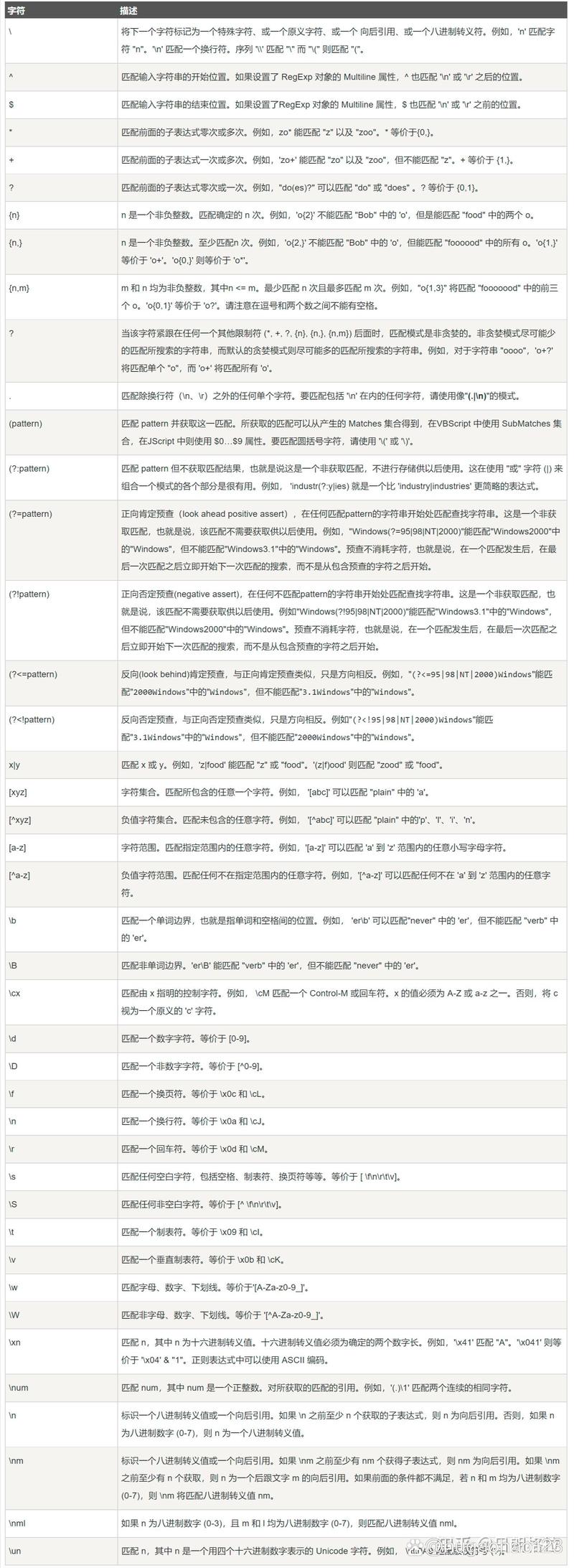
大括号在正则表达式中是量词,用于指定其前面的元素(单个字符、字符类或分组)必须出现的精确次数或次数范围,这是正则表达式中最强大和最常用的量词之一。
(图片来源网络,侵删)
基本用法:精确次数
这是大括号最简单的形式,用于指定一个确切的重复次数。
语法: {n}
含义: 匹配前面的元素恰好 n 次。
示例: 匹配一个由4位数字组成的年份。
(图片来源网络,侵删)
import java.util.regex.*;
public class RegexExample {
    public static void main(String[] args) {
        String regex = "\\d{4}"; // \d 匹配一个数字,{4} 表示恰好4次
        String text1 = "2025 is a good year.";
        String text2 = "I was born in 1999.";
        String text3 = "The year is 12345."; // 5位数字,不匹配
        String text4 = "The year is 99.";    // 2位数字,不匹配
        Pattern pattern = Pattern.compile(regex);
        System.out.println("--- 精确匹配 {n} ---");
        System.out.println("文本: \"" + text1 + "\" -> " + pattern.matcher(text1).find()); // true
        System.out.println("文本: \"" + text2 + "\" -> " + pattern.matcher(text2).find()); // true
        System.out.println("文本: \"" + text3 + "\" -> " + pattern.matcher(text3).find()); // false
        System.out.println("文本: \"" + text4 + "\" -> " + pattern.matcher(text4).find()); // false
    }
}
范围次数:最少和最多
如果你想匹配一个范围内的次数,可以使用逗号分隔两个数字。
语法: {n,m}
含义: 匹配前面的元素至少 n 次,但不超过 m 次。
注意: n 和 m 都是非负整数,n <= m。
(图片来源网络,侵删)
示例: 匹配一个由3到5位数字组成的ID。
import java.util.regex.*;
public class RegexRangeExample {
    public static void main(String[] args) {
        String regex = "\\d{3,5}"; // \d 匹配一个数字,{3,5} 表示3到5次
        String text1 = "ID: 123";      // 3位,匹配
        String text2 = "ID: 98765";   // 5位,匹配
        String text3 = "ID: 123456";  // 6位,不匹配
        String text4 = "ID: 12";      // 2位,不匹配
        Pattern pattern = Pattern.compile(regex);
        System.out.println("--- 范围匹配 {n,m} ---");
        System.out.println("文本: \"" + text1 + "\" -> " + pattern.matcher(text1).find()); // true
        System.out.println("文本: \"" + text2 + "\" -> " + pattern.matcher(text2).find()); // true
        System.out.println("文本: \"" + text3 + "\" -> " + pattern.matcher(text3).find()); // false
        System.out.println("文本: \"" + text4 + "\" -> " + pattern.matcher(text4).find()); // false
    }
}
最少次数,无上限
如果你想匹配至少 n 次,但没有上限,可以省略第二个数字。
语法: {n,}
含义: 匹配前面的元素至少 n 次。
示例: 匹配一个由至少2个字母组成的单词。
import java.util.regex.*;
public class RegexMinExample {
    public static void main(String[] args) {
        String regex = "[a-zA-Z]{2,}"; // [a-zA-Z] 匹配任意字母,{2,} 表示至少2次
        String text1 = "hello";       // 5个字母,匹配
        String text2 = "a";           // 1个字母,不匹配
        String text3 = "internationalization"; // 很长的单词,匹配
        Pattern pattern = Pattern.compile(regex);
        System.out.println("--- 最少次数匹配 {n,} ---");
        System.out.println("文本: \"" + text1 + "\" -> " + pattern.matcher(text1).find()); // true
        System.out.println("文本: \"" + text2 + "\" -> " + pattern.matcher(text2).find()); // false
        System.out.println("文本: \"" + text3 + "\" -> " + pattern.matcher(text3).find()); // true
    }
}
特殊情况:大括号作为字面字符
你只想匹配大括号字符 或 本身,而不是将其作为正则表达式的特殊元字符,这时,你需要对它们进行转义。
语法: \\{ 和 \\}
在 Java 字符串中,反斜杠 \ 本身也是一个转义字符,要在正则表达式中表示一个字面的反斜杠,你需要写成 \\,要表示一个字面的大括号,在 Java 字符串中你需要写成 \\{ 和 \\}。
示例: 匹配文本中的 格式的内容。
import java.util.regex.*;
public class LiteralBracesExample {
    public static void main(String[] args) {
        // \\{ 匹配左大括号,\\} 匹配右大括号
        String regex = "\\{.*?\\}";
        String text1 = "This is a {placeholder}.";
        String text2 = "No braces here.";
        String text3 = "Multiple {braces} {in} one {string}.";
        Pattern pattern = Pattern.compile(regex);
        System.out.println("--- 匹配字面大括号 ---");
        // find() 会找到第一个匹配项
        System.out.println("文本: \"" + text1 + "\" -> 匹配到: " + pattern.matcher(text1).find()); // true
        System.out.println("文本: \"" + text2 + "\" -> 匹配到: " + pattern.matcher(text2).find()); // false
        // 使用 find() 和 group() 来获取所有匹配项
        Matcher matcher = pattern.matcher(text3);
        System.out.println("文本: \"" + text3 + "\" -> 匹配到的内容:");
        while (matcher.find()) {
            System.out.println("  - " + matcher.group());
        }
    }
}
贪婪模式 vs. 懒惰模式
在使用 {n,m} 或 {n,} 时,默认情况下是贪婪模式,它会尽可能多地匹配字符。
贪婪模式: a.*b 会匹配从第一个 a 到最后一个 b 之间的所有内容。
如果你希望匹配尽可能少的字符,可以使用懒惰模式(或称非贪婪模式),在量词后面加上一个 。
语法: {n,m}? 或 {n,}?
示例: 解释贪婪和懒惰模式的区别。
import java.util.regex.*;
public class GreedyLazyExample {
    public static void main(String[] args) {
        String text = "<div>First</div><div>Second</div>";
        // 贪婪模式:会匹配从第一个 <div> 到最后一个 </div>
        String greedyRegex = "<div>.*</div>";
        // 懒惰模式:会匹配每一个独立的 <div>...</div> 对
        String lazyRegex = "<div>.*?</div>";
        System.out.println("--- 贪婪 vs. 懒惰模式 ---");
        System.out.println("文本: " + text);
        System.out.println("贪婪模式 '<div>.*</div>':");
        System.out.println("  -> 匹配结果: " + Pattern.compile(greedyRegex).matcher(text).group()); // <div>First</div><div>Second</div>
        System.out.println("\n懒惰模式 '<div>.*?</div>':");
        Matcher lazyMatcher = Pattern.compile(lazyRegex).matcher(text);
        while (lazyMatcher.find()) {
            System.out.println("  -> 匹配结果: " + lazyMatcher.group()); // <div>First</div> <div>Second</div>
        }
    }
}
| 语法 | 名称 | 含义 | 示例 (匹配 a) |
|---|---|---|---|
{n} |
精确次数 | 匹配前面的元素恰好 n 次。 |
a{3} 匹配 aaa |
{n,m} |
范围次数 | 匹配前面的元素至少 n 次,但不超过 m 次。 |
a{2,4} 匹配 aa, aaa, aaaa |
{n,} |
最少次数 | 匹配前面的元素至少 n 次。 |
a{2,} 匹配 aa, aaa, aaaa... |
\\{, \\} |
字面字符 | 匹配大括号 或 本身。 | \\{a\\} 匹配 {a} |
{n,m}? |
懒惰模式 | 匹配前面的元素至少 n 次,但尽可能少。 |
a{2,4}? 匹配 aa |
掌握大括号的用法是编写高效、精确正则表达式的关键。