Of course! Working with CSV files in Java to load data into MySQL is a very common task, especially for data migration, reporting, or bulk inserts. Here’s a comprehensive guide covering the best practices, different methods, and a complete, runnable example.
Overview of the Process
The general workflow is:
- Connect to MySQL: Establish a connection to your MySQL database using JDBC.
- Read the CSV File: Iterate through the lines of the CSV file.
- Parse Each Line: Split each line into individual data fields (columns).
- Prepare Data: Handle data types, escaping special characters, and
NULLvalues. - Insert Data: Insert the parsed data into the appropriate MySQL table.
Method 1: The Classic JDBC Approach (Good for Learning)
This method involves manually reading the file and using standard JDBC PreparedStatements. It's great for understanding the fundamentals but can be slow for very large files.
Step 1: Prerequisites
-
MySQL Server: You need a running MySQL server.
-
Java Development Kit (JDK): Ensure you have JDK 8 or newer.
 (图片来源网络,侵删)
 -
MySQL Connector/J: This is the JDBC driver for MySQL.
- Download: Get the latest version from the MySQL Connector/J Download Page.
- Add to Project: Add the JAR file to your project's classpath. If you're using a build tool like Maven or Gradle, add the dependency instead.
Maven
pom.xml:<dependency> <groupId>com.mysql</groupId> <artifactId>mysql-connector-j</artifactId> <version>8.0.33</version> <!-- Use the latest version --> </dependency>Gradle
build.gradle:implementation 'com.mysql:mysql-connector-j:8.0.33' // Use the latest version
Step 2: Create a MySQL Table
Let's assume you have a CSV file named users.csv with the following content:
id,username,email,registration_date
1,alice,alice@example.com,2025-01-15
2,bob,bob@example.com,2025-02-20
3,charlie,charlie@example.com,2025-03-10
You would need a corresponding table in MySQL:
CREATE DATABASE IF NOT EXISTS myapp;
USE myapp;
CREATE TABLE users (
    id INT PRIMARY KEY,
    username VARCHAR(50) NOT NULL,
    email VARCHAR(100) UNIQUE,
    registration_date DATE
);
Step 3: Write the Java Code
This code reads the CSV line by line and inserts each row using a PreparedStatement.
CsvToMysqlLoader.java
import java.io.BufferedReader;
import java.io.FileReader;
import java.io.IOException;
import java.sql.Connection;
import java.sql.DriverManager;
import java.sql.PreparedStatement;
import java.sql.SQLException;
import java.sql.Date;
public class CsvToMysqlLoader {
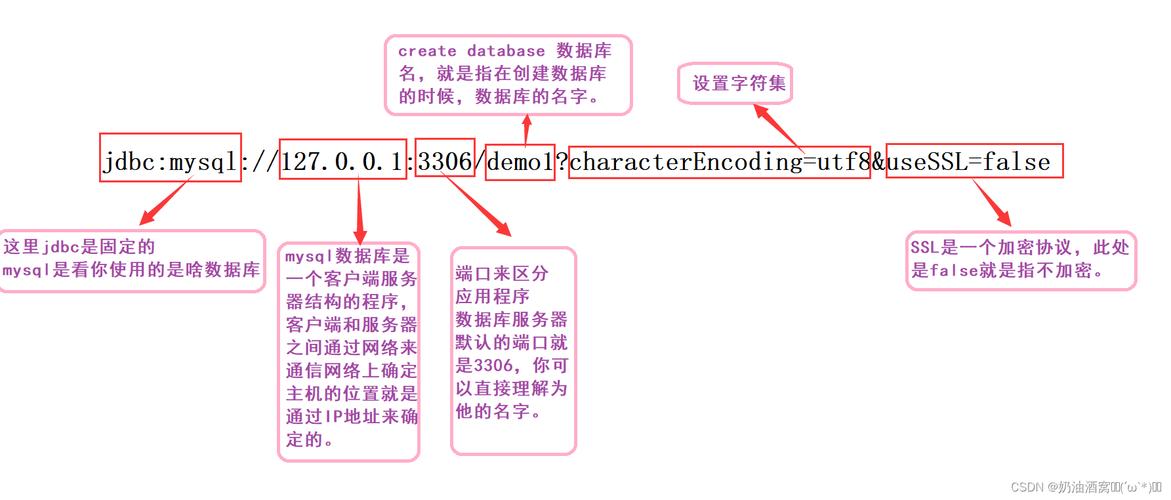
    private static final String JDBC_URL = "jdbc:mysql://localhost:3306/myapp?useSSL=false&serverTimezone=UTC";
    private static final String DB_USER = "root";
    private static final String DB_PASSWORD = "your_password"; // Replace with your password
    public static void main(String[] args) {
        String csvFilePath = "users.csv"; // Path to your CSV file
        // Use try-with-resources to ensure resources are closed automatically
        try (Connection connection = DriverManager.getConnection(JDBC_URL, DB_USER, DB_PASSWORD);
             BufferedReader br = new BufferedReader(new FileReader(csvFilePath))) {
            // Skip the header row
            String line = br.readLine();
            if (line == null) {
                System.out.println("CSV file is empty.");
                return;
            }
            // Prepare the SQL statement with placeholders
            String sql = "INSERT INTO users (id, username, email, registration_date) VALUES (?, ?, ?, ?)";
            PreparedStatement pstmt = connection.prepareStatement(sql);
            int batchSize = 0;
            final int MAX_BATCH_SIZE = 1000; // Commit every 1000 rows for performance
            while ((line = br.readLine()) != null) {
                // Split the line by comma, handling quoted fields if necessary
                String[] values = line.split(",");
                // Set parameters for the prepared statement
                pstmt.setInt(1, Integer.parseInt(values[0].trim()));
                pstmt.setString(2, values[1].trim());
                pstmt.setString(3, values[2].trim());
                pstmt.setDate(4, Date.valueOf(values[3].trim()));
                pstmt.addBatch(); // Add the statement to the batch
                batchSize++;
                // Execute batch if it reaches the batch size
                if (batchSize % MAX_BATCH_SIZE == 0) {
                    pstmt.executeBatch();
                    System.out.println("Executed batch of " + MAX_BATCH_SIZE);
                }
            }
            // Execute any remaining statements in the batch
            pstmt.executeBatch();
            System.out.println("Data loaded successfully into MySQL.");
        } catch (IOException e) {
            System.err.println("Error reading CSV file: " + e.getMessage());
        } catch (SQLException e) {
            System.err.println("Database error: " + e.getMessage());
            e.printStackTrace();
        } catch (Exception e) {
            System.err.println("An unexpected error occurred: " + e.getMessage());
        }
    }
}
Method 2: Using a CSV Library (Recommended for Robustness)
Manually parsing CSV can be tricky. What if a field contains a comma, a newline, or is quoted? Using a dedicated library like Apache Commons CSV is much safer and more robust.
Step 1: Add the Library Dependency
Maven pom.xml:
<dependency>
    <groupId>org.apache.commons</groupId>
    <artifactId>commons-csv</artifactId>
    <version>1.10.0</version> <!-- Use the latest version -->
</dependency>
Gradle build.gradle:
implementation 'org.apache.commons:commons-csv:1.10.0' // Use the latest version
Step 2: Write the Java Code with Apache Commons CSV
The code becomes cleaner and handles edge cases automatically.
CsvLoaderWithLibrary.java
import org.apache.commons.csv.CSVFormat;
import org.apache.commons.csv.CSVParser;
import org.apache.commons.csv.CSVRecord;
import java.io.FileReader;
import java.io.IOException;
import java.io.Reader;
import java.sql.Connection;
import java.sql.DriverManager;
import java.sql.PreparedStatement;
import java.sql.SQLException;
import java.sql.Date;
public class CsvLoaderWithLibrary {
    private static final String JDBC_URL = "jdbc:mysql://localhost:3306/myapp?useSSL=false&serverTimezone=UTC";
    private static final String DB_USER = "root";
    private static final String DB_PASSWORD = "your_password"; // Replace with your password
    public static void main(String[] args) {
        String csvFilePath = "users.csv";
        try (Connection connection = DriverManager.getConnection(JDBC_URL, DB_USER, DB_PASSWORD);
             Reader reader = new FileReader(csvFilePath);
             CSVParser csvParser = new CSVParser(reader, CSVFormat.DEFAULT.withFirstRecordAsHeader())) {
            // The withFirstRecordAsHeader() method automatically maps column names
            String sql = "INSERT INTO users (id, username, email, registration_date) VALUES (?, ?, ?, ?)";
            PreparedStatement pstmt = connection.prepareStatement(sql);
            int batchSize = 0;
            final int MAX_BATCH_SIZE = 1000;
            for (CSVRecord record : csvParser) {
                // Access columns by header name (much safer than index!)
                pstmt.setInt(1, Integer.parseInt(record.get("id")));
                pstmt.setString(2, record.get("username"));
                pstmt.setString(3, record.get("email"));
                pstmt.setDate(4, Date.valueOf(record.get("registration_date")));
                pstmt.addBatch();
                batchSize++;
                if (batchSize % MAX_BATCH_SIZE == 0) {
                    pstmt.executeBatch();
                    System.out.println("Executed batch of " + MAX_BATCH_SIZE);
                }
            }
            pstmt.executeBatch();
            System.out.println("Data loaded successfully using Apache Commons CSV.");
        } catch (IOException e) {
            System.err.println("Error reading CSV file: " + e.getMessage());
        } catch (SQLException e) {
            System.err.println("Database error: " + e.getMessage());
            e.printStackTrace();
        } catch (IllegalArgumentException e) {
            System.err.println("Data conversion error: " + e.getMessage());
        }
    }
}
Method 3: Using MySQL's LOAD DATA INFILE (Fastest for Large Files)
For very large CSV files, sending row-by-row inserts over the network is extremely slow. MySQL has a built-in command, LOAD DATA INFILE, that is orders of magnitude faster because it reads the file directly from the server's filesystem.
How it works:
- You place the CSV file on the MySQL server's machine.
- You execute a SQL command telling MySQL to read that file and load its contents into a table.
Step 1: Prepare the CSV File
Place your users.csv file in an accessible directory on the server, for example, /tmp/users.csv.
Step 2: Grant File Privileges to the MySQL User
The user needs permission to read files from the server's filesystem.
GRANT FILE ON *.* TO 'root'@'localhost';
FLUSH PRIVILEGES;
Step 3: Write the Java Code
The Java code is now very simple: it just needs to execute the SQL command.
LoadDataInfileExample.java
import java.sql.Connection;
import java.sql.DriverManager;
import java.sql.SQLException;
import java.sql.Statement;
public class LoadDataInfileExample {
    private static final String JDBC_URL = "jdbc:mysql://localhost:3306/myapp?useSSL=false&serverTimezone=UTC";
    private static final String DB_USER = "root";
    private static final String DB_PASSWORD = "your_password";
    public static void main(String[] args) {
        String csvFilePath = "/tmp/users.csv"; // Path ON THE SERVER
        String tableName = "users";
        // Ensure the table is empty before loading
        String deleteSql = "TRUNCATE TABLE " + tableName;
        String loadSql = "LOAD DATA INFILE '" + csvFilePath + "'" +
                " INTO TABLE " + tableName +
                " FIELDS TERMINATED BY ','" +
                " ENCLOSED BY '\"'" +
                " LINES TERMINATED BY '\n'" +
                " IGNORE 1 ROWS"; // To skip the header row
        try (Connection connection = DriverManager.getConnection(JDBC_URL, DB_USER, DB_PASSWORD);
             Statement stmt = connection.createStatement()) {
            System.out.println("Clearing existing data from table: " + tableName);
            stmt.execute(deleteSql);
            System.out.println("Loading data from " + csvFilePath + "...");
            int rowsAffected = stmt.executeUpdate(loadSql);
            System.out.println(rowsAffected + " rows loaded successfully into " + tableName + ".");
        } catch (SQLException e) {
            System.err.println("Database error: " + e.getMessage());
            e.printStackTrace();
        }
    }
}
Important Notes for LOAD DATA INFILE:
- File Path: The path must be on the server's filesystem, not the client's.
- Permissions: The MySQL user must have the
FILEprivilege. - File Ownership: The MySQL server process (e.g.,
mysqld) must have read permissions for the file. - Security: This is very fast but can be a security risk if not handled carefully, as it can potentially read any file the server process can access.
Summary: Which Method to Choose?
| Method | Pros | Cons | Best For |
|---|---|---|---|
| Classic JDBC | - No external libraries needed (besides JDBC driver) - Simple to understand for small tasks. |
- Slow for large files - Manual parsing is error-prone (commas, quotes, etc.). |
Quick scripts, small files, or learning purposes. |
| CSV Library | - Robust parsing (handles edge cases) - Clean, readable code - Safer than manual parsing. |
- Slight overhead from the library. | Most general-purpose applications. The recommended approach for reliability. |
LOAD DATA INFILE |
- Extremely fast (best performance) - Low network overhead. |
- Requires file access on the server - Needs special FILE privileges- Less flexible for data transformation before loading. |
Very large datasets (millions of rows) where performance is critical. |