Of course! Let's build a Python classifier from the ground up. We'll cover the entire process, from understanding the concepts to writing the code and evaluating the results.
We'll use the popular Scikit-learn library, which is the standard for machine learning in Python. It makes building classifiers incredibly simple and efficient.
The Goal: A Step-by-Step Guide
We will:
- Understand what a classifier is.
- Choose a simple and classic dataset to work with.
- Preprocess the data.
- Choose a classification algorithm.
- Train the model.
- Evaluate its performance.
- Use the trained model to make predictions on new data.
Step 1: What is a Classifier?
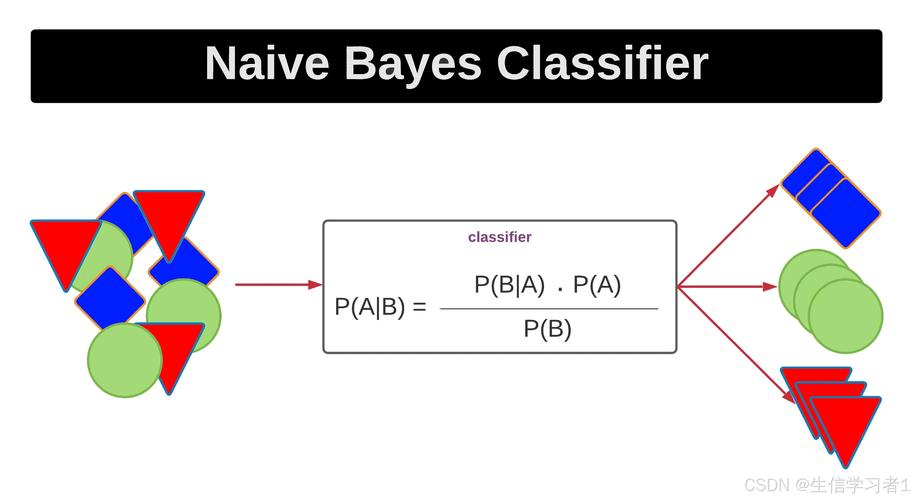
A classifier is a type of machine learning model that learns to assign a label (or class) to an input based on its features.
- Features: The input variables or attributes of the data (e.g., for an email, features could be "contains the word 'free'", "has a link", "sender is not in contacts").
- Label: The output or category we want to predict (e.g., "Spam" or "Not Spam").
Our task is to train a model on a dataset where the labels are already known. The model learns the relationship between the features and the labels. Then, we can give it new, unseen data, and it will predict the correct label.
Step 2: Setup and Dataset
First, make sure you have the necessary libraries installed. If not, open your terminal or command prompt and run:
pip install scikit-learn pandas matplotlib seaborn
We'll use the famous Iris dataset, which is built into Scikit-learn. It's perfect for classification because it's simple, clean, and well-understood.
- Goal: Predict the species of an iris flower.
- Features: Sepal length, Sepal width, Petal length, Petal width.
- Labels (Classes): Setosa, Versicolor, Virginica (3 classes).
Step 3: The Full Python Code
Here is the complete, commented Python script. We'll break down each part below.
# 1. IMPORT LIBRARIES
import pandas as pd
import seaborn as sns
import matplotlib.pyplot as plt
from sklearn.model_selection import train_test_split
from sklearn.preprocessing import StandardScaler
from sklearn.neighbors import KNeighborsClassifier
from sklearn.metrics import classification_report, confusion_matrix, accuracy_score
# 2. LOAD AND EXPLORE THE DATASET
# Load the Iris dataset from Seaborn
iris = sns.load_dataset('iris')
print("--- First 5 rows of the dataset ---")
print(iris.head())
print("\n--- Dataset Info ---")
iris.info()
# 3. PREPROCESS THE DATA
# Separate features (X) and the target label (y)
X = iris.drop('species', axis=1) # All columns except 'species'
y = iris['species']             # Only the 'species' column
# Split the data into training and testing sets
# 80% for training, 20% for testing
# random_state ensures reproducibility
X_train, X_test, y_train, y_test = train_test_split(X, y, test_size=0.2, random_state=42)
print(f"\nTraining set size: {X_train.shape[0]} samples")
print(f"Testing set size: {X_test.shape[0]} samples")
# Feature Scaling: It's good practice to scale features
# KNN and many other algorithms are sensitive to the scale of features
scaler = StandardScaler()
X_train = scaler.fit_transform(X_train)
X_test = scaler.transform(X_test) # Use the same scaler fitted on the training data
# 4. CHOOSE AND TRAIN THE CLASSIFIER
# We'll use the K-Nearest Neighbors (KNN) algorithm
# n_neighbors=3 means we'll look at the 3 nearest neighbors to make a prediction
knn = KNeighborsClassifier(n_neighbors=3)
# Train the model on the training data
knn.fit(X_train, y_train)
print("\nModel trained successfully!")
# 5. EVALUATE THE CLASSIFIER
# Make predictions on the test data
y_pred = knn.predict(X_test)
# Calculate the accuracy
accuracy = accuracy_score(y_test, y_pred)
print(f"\nModel Accuracy: {accuracy:.2f}")
# Display a detailed classification report
print("\n--- Classification Report ---")
print(classification_report(y_test, y_pred))
# Display the confusion matrix
print("\n--- Confusion Matrix ---")
cm = confusion_matrix(y_test, y_pred)
print(cm)
# Visualize the confusion matrix
plt.figure(figsize=(8, 6))
sns.heatmap(cm, annot=True, fmt='d', cmap='Blues',
            xticklabels=iris['species'].unique(),
            yticklabels=iris['species'].unique())
plt.xlabel('Predicted Label')
plt.ylabel('True Label')'Confusion Matrix')
plt.show()
# 6. MAKE PREDICTIONS ON NEW DATA
# Let's create a new, hypothetical flower to classify
# The values are: [sepal_length, sepal_width, petal_length, petal_width]
new_flower_data = [[5.1, 3.5, 1.4, 0.2]] # This looks like a Setosa
# IMPORTANT: The new data must be scaled using the SAME scaler
new_flower_scaled = scaler.transform(new_flower_data)
# Predict the species of the new flower
prediction = knn.predict(new_flower_scaled)
print(f"\n--- Prediction for new flower ---")
print(f"Features: {new_flower_data[0]}")
print(f"Predicted Species: {prediction[0]}")
Step 4: Detailed Breakdown of the Code
Import Libraries
We import pandas for data handling, seaborn and matplotlib for visualization, and the necessary components from sklearn for our machine learning workflow.
Load and Explore the Dataset
iris = sns.load_dataset('iris')
print(iris.head())
sns.load_dataset('iris')loads the Iris dataset directly into a pandas DataFrame.print(iris.head())shows us the first 5 rows to get a feel for the data. We can see the four features and the targetspeciescolumn.
Preprocess the Data
This is a crucial step.
X = iris.drop('species', axis=1)
y = iris['species']
- We separate our data into
X(the features) andy(the label/what we want to predict).
X_train, X_test, y_train, y_test = train_test_split(X, y, test_size=0.2, random_state=42)
- We split our data into a training set (80%) and a testing set (20%).
- The model learns from the training set.
- We use the testing set (which the model has never seen) to evaluate how well it has learned. This gives an unbiased measure of performance.
random_state=42is like a seed for the random number generator. It ensures that every time you run the code, you get the exact same split, making your results reproducible.
scaler = StandardScaler()
X_train = scaler.fit_transform(X_train)
X_test = scaler.transform(X_test)
- Feature Scaling standardizes the features by removing the mean and scaling to unit variance. For algorithms like K-Nearest Neighbors (KNN), this is essential because it ensures that features with larger scales (like petal length) don't dominate features with smaller scales (like sepal width).
fit_transformlearns the scaling parameters from the training data and applies the transformation.transformapplies the same transformation to the test data. We neverfiton the test data, as that would be "cheating" by letting the model see information it shouldn't.
Choose and Train the Classifier
knn = KNeighborsClassifier(n_neighbors=3)
knn.fit(X_train, y_train)
- We choose the K-Nearest Neighbors (KNN) algorithm. It's a simple, intuitive algorithm that classifies a data point based on how its neighbors are classified.
n_neighbors=3means it will look at the 3 closest data points to make a decision. knn.fit(X_train, y_train)is the training step. The model "learns" the patterns in the training data.
Evaluate the Classifier
y_pred = knn.predict(X_test)
- We use the trained model to predict the labels for our
X_testdata.
accuracy = accuracy_score(y_test, y_pred)
print(f"Model Accuracy: {accuracy:.2f}")
- Accuracy is the simplest metric: the percentage of correct predictions.
print(classification_report(y_test, y_pred))
- The Classification Report gives more detailed metrics:
- Precision: Of all the predictions for a class, how many were correct?
- Recall: Of all the actual instances of a class, how many did the model correctly identify?
- F1-score: A weighted average of precision and recall.
cm = confusion_matrix(y_test, y_pred)
sns.heatmap(cm, annot=True, fmt='d', cmap='Blues')
- The Confusion Matrix is a table that visualizes the model's performance. The diagonal shows correct predictions, while the off-diagonal elements show where the model made mistakes. The heatmap makes it easy to see.
Make Predictions on New Data
new_flower_data = [[5.1, 3.5, 1.4, 0.2]]
new_flower_scaled = scaler.transform(new_flower_data)
prediction = knn.predict(new_flower_scaled)
- This is the final goal. We create a new data point (a flower we just found) with its four features.
- Crucially, we must apply the same scaling we used on the training data.
- We then call
predict()on our trained model to get the predicted species.
Other Popular Classifiers in Scikit-learn
KNN is great for starting, but Scikit-learn offers many others. The process is almost identical!
Logistic Regression (Good for binary classification, but works for multi-class too)
from sklearn.linear_model import LogisticRegression
log_reg = LogisticRegression()
log_reg.fit(X_train, y_train)
Support Vector Machine (SVM)
from sklearn.svm import SVC
svm_model = SVC(kernel='linear')
svm_model.fit(X_train, y_train)
Random Forest (A powerful ensemble method)
from sklearn.ensemble import RandomForestClassifier
rf_model = RandomForestClassifier(n_estimators=100)
rf_model.fit(X_train, y_train)
You can simply replace the classifier part of the code with one of these to see how they perform. The key is that Scikit-learn provides a consistent API (fit(), predict()) across all its models.